
Web development means building and maintaining websites and web applications. The work splits into three roles. Front-end development builds what a visitor sees and clicks. Back-end development runs the logic and data behind that screen. Full-stack development covers both. This article walks through each role. It also shows how a page request travels from browser to server and back, and names a starting course for each path.
A short, sourced history
Tim Berners-Lee, working at CERN, wrote the proposal for the World Wide Web in March 1989. CERN's own history of the web states its purpose plainly. The web was built to meet the demand for automated information sharing between scientists in universities and institutes around the world (CERN).
By the end of 1990, Berners-Lee had a working web server and browser running at CERN. He announced the WWW software on internet newsgroups in August 1991. CERN then released the source code royalty free in April 1993, a decision that let the web grow without a licence fee (CERN).
How a web page reaches your screen
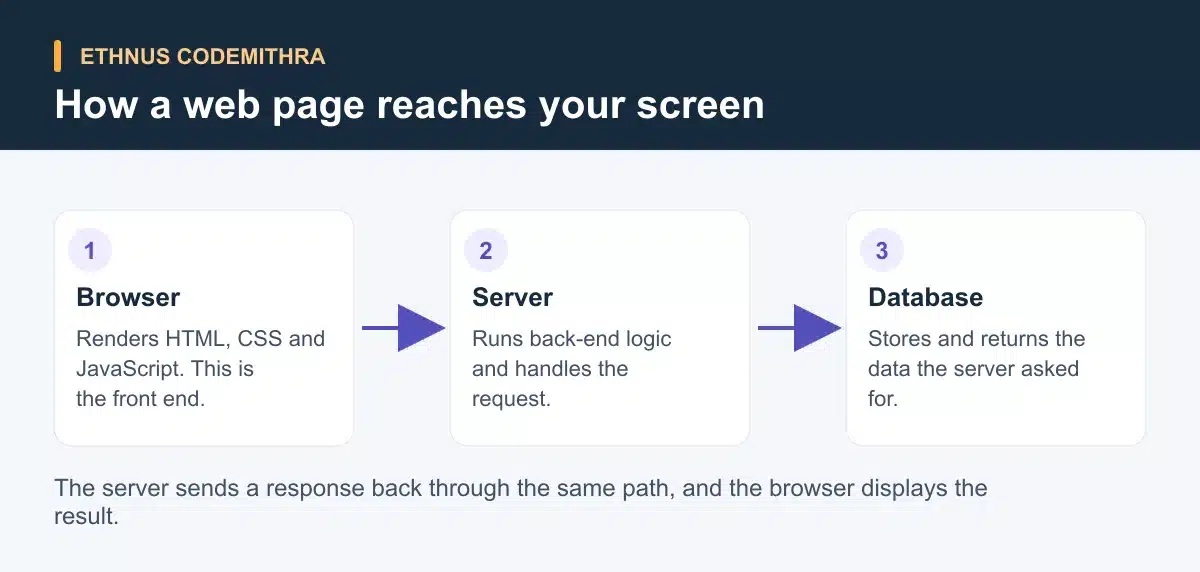
Before naming any language, it helps to see where each role sits. When you open a web page, your browser sends a request to a server. The server runs the back-end logic, asks a database for data if it needs to, and sends a response back. The browser then renders that response as the page you see.
Front-end development
HTML defines the meaning and structure of web content. CSS and JavaScript handle its presentation and behaviour (MDN's HTML documentation). CSS is a stylesheet language used to describe the presentation of an HTML document (MDN's CSS documentation). JavaScript is a lightweight, interpreted language standardised as ECMAScript. The committee that maintains that standard, TC39, meets every two months to review new proposals. So the language keeps moving rather than settling on one "current" version (MDN, TC39).
A minimal page needs only HTML for structure and CSS for appearance. Here is a small page you can save as an HTML file and open in a browser.
<!DOCTYPE html>
<html lang="en">
<head>
  <meta charset="UTF-8">
  <title>My first page</title>
  <style>
    body { font-family: Arial, sans-serif; margin: 40px; }
    .highlight { color: #5350bd; font-weight: bold; }
  </style>
</head>
<body>
  <h1>Hello, web!</h1>
  <p>This paragraph is styled with <span class="highlight">CSS</span>.</p>
  <button onclick="alert('You clicked the button.')">Click me</button>
</body>
</html>
The heading and paragraph are HTML. The colour and spacing come from the CSS inside the <style> tag. The one line of JavaScript on the button adds behaviour when a visitor clicks it. Once you know plain HTML, CSS and JavaScript, most front-end teams add a library or framework to manage larger pages. React describes itself through components. Its documentation calls a component "a piece of the UI that has its own logic and appearance," built as JavaScript functions that return markup (React documentation). Vue describes itself as "a JavaScript framework for building user interfaces" and calls itself "the progressive framework" (Vue documentation). Angular describes itself as "the framework for building scalable web apps with confidence." A team at Google maintains it (Angular documentation). None of the three is objectively best. Each solves the same problem of keeping a large page organised. Most students pick one based on what a target job listing or course teaches first.
Back-end development
The back end is the part of a web application a visitor never sees directly. A server-side language or runtime receives the request the browser sent. It runs the logic the application needs and talks to a database when it has to read or write data. Node.js is one example. Its own documentation describes it as "an asynchronous event-driven JavaScript runtime designed to build scalable network applications" (Node.js documentation). That design lets a team use JavaScript on both the front end and the back end. Other common back-end languages include Python, PHP and Java, each with its own frameworks.
Take a login form as an example. When a visitor submits a username and password, the browser sends that data to the server. The server checks it against records stored in a database. It then sends back a response saying whether the login worked. Every step after that, including checking the password and reading the database, happens on the back end.
Full-stack development, briefly
A full-stack developer works across the front end and the back end, plus the database layer that connects them. This article only introduces the idea. For how these pieces combine into named stacks such as MERN or MEAN, read what is a full stack developer. That article also covers what a full-stack developer does day to day.
Front end vs back end vs full stack
| Role | Languages and tools | What it owns | Order learned |
|---|---|---|---|
| Front end | HTML, CSS, JavaScript, plus a library or framework such as React, Vue or Angular | What a visitor sees and interacts with in the browser | First |
| Back end | A server language or runtime such as Node.js, Python, PHP or Java, plus a database | Application logic, data storage and access control | After front-end basics |
| Full stack | Both of the above, plus how they connect | The whole request-and-response flow, front end to database | By combining both paths |
Where Ethnus Codemithra fits
Ethnus Codemithra runs two current programs that map onto the paths above. The MERN Full Stack program covers HTML5, CSS3, Bootstrap and JavaScript, including ES6 and TypeScript. It also covers Node.js, Express.js, MongoDB and React, and now includes basics of Python and generative AI. The program runs on expert-led guidance sessions, step-by-step walkthroughs and instant doubt clearing, through the Codemithra Learning and Assessment Platform. A resume building workshop and practice interviews form part of its placement support.
For a Java-first, back-end-leaning entry point instead, the JaWEsome program covers Java fundamentals, object-oriented programming, and exception handling, multi-threading and collections. It also covers HTML, CSS and JavaScript, with exposure to AWS, cybersecurity, Salesforce and MERN full stack. Both programs appear on Codemithra's current course list. Ethnus reached the milestone of training over 5 lakh students across all its programs (Ethnus about page).
Getting started
Start with HTML and CSS, using a free reference such as MDN. It is the same source cited above for the definitions of HTML, CSS and JavaScript. Build the minimal page from this article. Then add one small feature to it, such as a second styled section or a second button. After that, pick a direction. Keep building on the front end, move to a back-end language, or start a structured program that covers both at once, such as MERN Full Stack.
Frequently asked questions
Do I need to learn front end before back end?
Not strictly. Most students find it easier to learn HTML, CSS and JavaScript first. That gives you something visible to test back-end logic against.
Is React a framework or a library?
React describes itself through its components rather than calling itself a framework outright. Its own documentation calls a component "a piece of the UI that has its own logic and appearance" (React documentation).
Can I build a website with only HTML and CSS?
Yes. A page with no JavaScript still displays and reads content correctly. JavaScript adds behaviour, such as reacting to a click, but a static page does not need it.
What is the difference between a web developer and a full-stack developer?
"Web developer" can mean someone working on just the front end, just the back end, or both. "Full-stack developer" specifically means someone who works across the front end, the back end and the database that connects them.
Which Ethnus Codemithra program should I start with?
Start with MERN Full Stack if you want to work across the front end and back end from the start. Look at JaWEsome if you prefer a Java-first foundation with web basics included.