
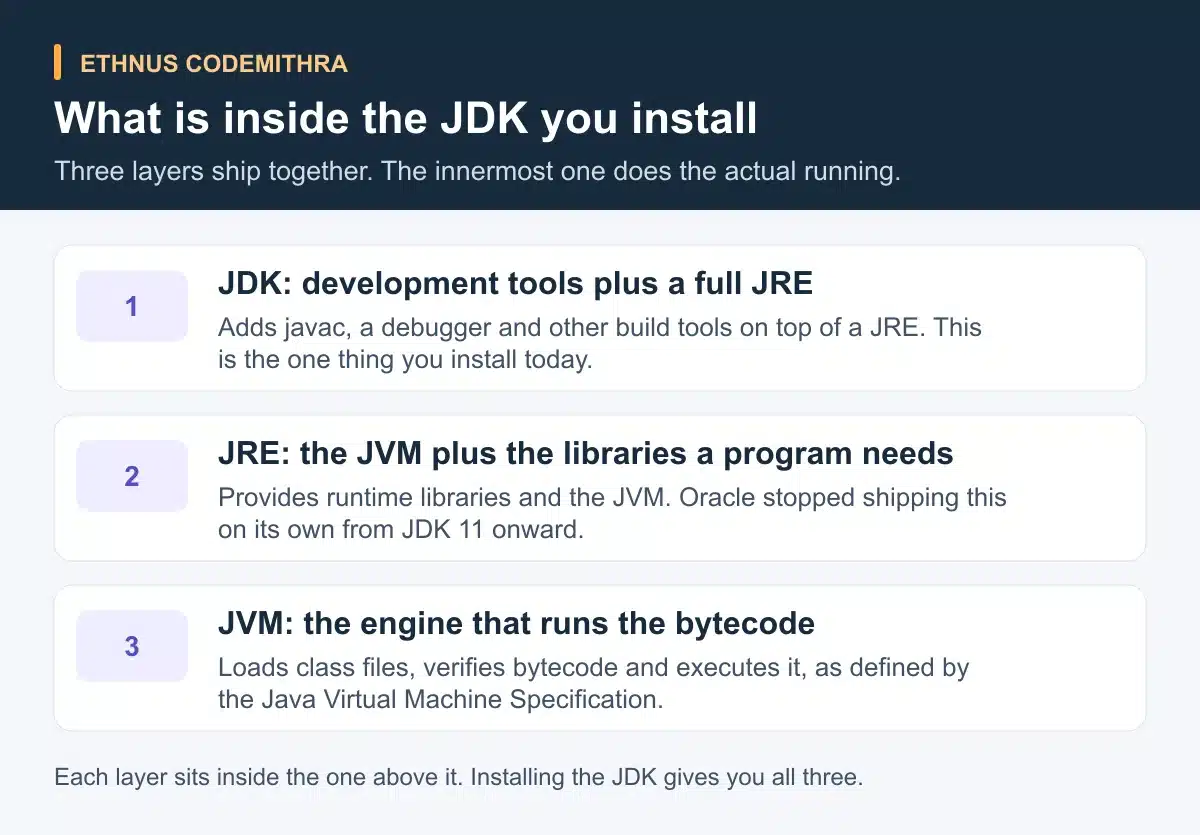
The JDK is the full development kit you install to write and compile Java programs. It contains a JRE, the runtime environment a compiled program needs to run. The JRE in turn contains the JVM, the engine that runs your compiled code. A JaWEsome install guide tells you to install the JDK. Only the JDK gives you a compiler.
If your install steps stopped there and moved on, this article fills the gap. It explains what each of the three layers does. It also explains why an install guide only ever names one of them, and what happens the moment you type javac and then java.
JVM: the thing that actually runs your program
The Java Virtual Machine is an abstract computing machine. Oracle describes it as the cornerstone of the Java platform. It does not read Java source code at all. It reads only the class file format: bytecode instructions and the symbol tables inside a compiled .class file (Java Virtual Machine Specification, chapter 1).
That narrow focus is what makes Java code portable. A .class file holds bytecode, "the machine language of the Java Virtual Machine". The same file runs unmodified on Windows, Linux and Mac OS. Each platform has its own JVM to interpret that bytecode (Oracle, Java technology: an overview). The JVM never sees your .java file. Somebody has to turn source code into bytecode first, and that is a separate job.
JRE: the JVM plus the libraries a running program needs
A compiled program rarely stands alone. It calls built-in classes for strings, collections and file access. The Java Runtime Environment supplies those library classes together with the JVM. Together they give a compiled program everything it needs to run.
For years, Oracle shipped the JRE as its own separate download, distinct from the JDK. That changed with JDK 11. Oracle stopped offering standalone JRE and Server JRE installers, along with the auto-update feature that came with them (Oracle, significant changes in JDK 11). A student installing Java today never sees a separate JRE installer to get confused by. Every current JDK download already contains one.
JDK: the JRE plus the tools that make a program in the first place
The Java Development Kit is the JRE plus the command-line tools a developer needs before a program can run. The two you will use immediately are javac and java.
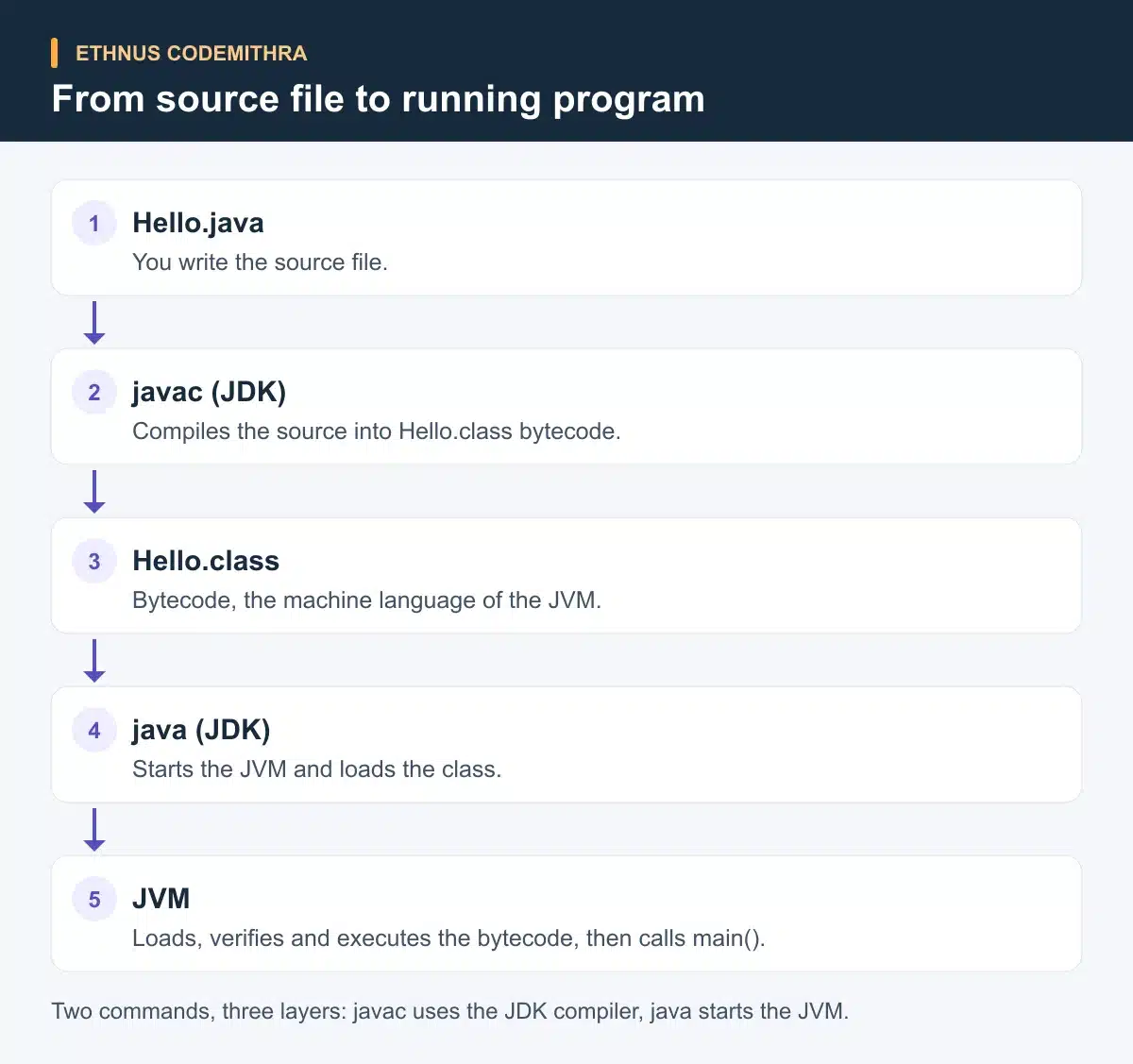
javac reads a .java source file. It compiles the module, package and type declarations in that file into a .class file. Source files must be named with a .java extension, and the compiler produces .class files that run on the JVM (Oracle, javac tool reference).
java does the opposite job. It starts the JVM, loads the class you name, and calls its public static void main(String[] args) method (Oracle, java tool reference).
Put together, a JDK download is not one product but three, nested inside each other. The outer layer adds the tools that make a program. The middle layer supplies what a program needs to run. The inner layer is what actually runs it.
A recent example is JDK 25. It reached general availability on 16 September 2025 and is a long-term support release from most vendors. It is also the reference implementation of Java SE 25 (OpenJDK, JDK 25 project page). OpenJDK releases a new version every six months. Treat any version number as a dated example, not a permanent "latest".
What happens when you compile and run one file
The clearest way to see all three layers work is to follow one file through both commands.
javac Hello.java
java Hello
The first line uses javac, a JDK tool, to read Hello.java and write out Hello.class bytecode. Nothing runs yet. The second line uses java, also a JDK tool, to start the JVM. The JVM then loads Hello.class and calls its main() method. The JRE libraries sit underneath both commands, ready whenever the compiled code calls a built-in class.
Try it yourself
Save a file named Hello.java. Give it a class called Hello with a main method that prints a line of text. Open a terminal in that folder and run the two commands above in order. After the first line, check the folder. A new Hello.class file should appear next to your source file, with no output printed yet. After the second line, your text should print to the terminal. If you run java Hello before javac Hello.java, the launcher fails to find a class file. The JVM never reads .java source directly.
JDK vs JRE vs JVM at a glance
| Layer | What it contains | Who needs it | Command or tool that exposes it | Standalone today |
|---|---|---|---|---|
| JVM | Bytecode execution engine: class loader, bytecode verifier, execution engine | Anyone running a compiled Java program, even without knowing it | Started by the java launcher |
Not distributed on its own by Oracle |
| JRE | The JVM plus the runtime libraries a program calls | Anyone running compiled Java code | No dedicated Oracle command since JDK 11 | Bundled inside the JDK, not offered as a separate Oracle download |
| JDK | A full JRE plus development tools such as javac and a debugger |
Anyone writing or compiling Java code | javac to compile, java to run |
The one thing Oracle distributes as a direct download from JDK 11 onward |
Where this fits in a first Java course
The JaWEsome program from Ethnus lists compiling and executing, taught on the command line and in the Eclipse IDE, as part of its Introduction-to-Java module. That single syllabus line sits right alongside the first lessons on data types and control flow. It is this exact question: what happens between writing source code and seeing a program run.
The program pairs that topic with expert-led sessions and step-by-step walkthroughs. Instant doubt clearing runs through the Codemithra Learning & Assessment Platform. A beginner stuck on a missing .class file or a launcher error has somewhere to ask, before it turns into a bigger blocker.
Frequently asked questions
Do I need to install the JRE separately from the JDK?
No. Oracle stopped offering standalone JRE and Server JRE downloads from JDK 11 onward. Every current Oracle JDK already contains the JRE and JVM it needs (Oracle, significant changes in JDK 11).
Can the JVM run my .java file directly?
No. The JVM only understands the class file format and bytecode. It does not read Java source code, so a .java file must be compiled with javac first (Java Virtual Machine Specification, chapter 1).
Why does a compiled .class file run on any operating system?
A .class file contains bytecode. Each operating system has its own JVM built to interpret that same bytecode. That is why the identical file runs unmodified on Windows, Linux and Mac OS (Oracle, Java technology: an overview).
Which JDK version should I install for a first course?
Check your own course install guide for the exact version it expects. JDK 25 is one current example. It is a long-term support release that reached general availability on 16 September 2025, and OpenJDK releases a new version every six months (OpenJDK, JDK 25 project page).
Checked against the official Oracle and OpenJDK documentation on 8 September 2026.
If terminology like this slows down your first week of Java, the JaWEsome program from Ethnus Codemithra covers compiling and executing on the command line and in the Eclipse IDE, with trainer-led sessions to work through this kind of build error.