
Reducing network latency on AWS is not one setting you turn on. It is a set of ordered choices. Host near your users, cache what you can, and route smartly across the rest. Then connect dedicated links where they pay off, and pick compute built for high-throughput traffic. This guide walks through each choice and when to use it.
Network latency is the time a request spends travelling between a user and your application, plus the time your application takes to respond. Physical distance, DNS lookups, TCP and TLS handshakes, and congestion at any single point all add to that number. AWS offers a specific service for most of these delay sources. The rest of this article works through them in the order a request meets them.
Start with proximity: regions and availability zones
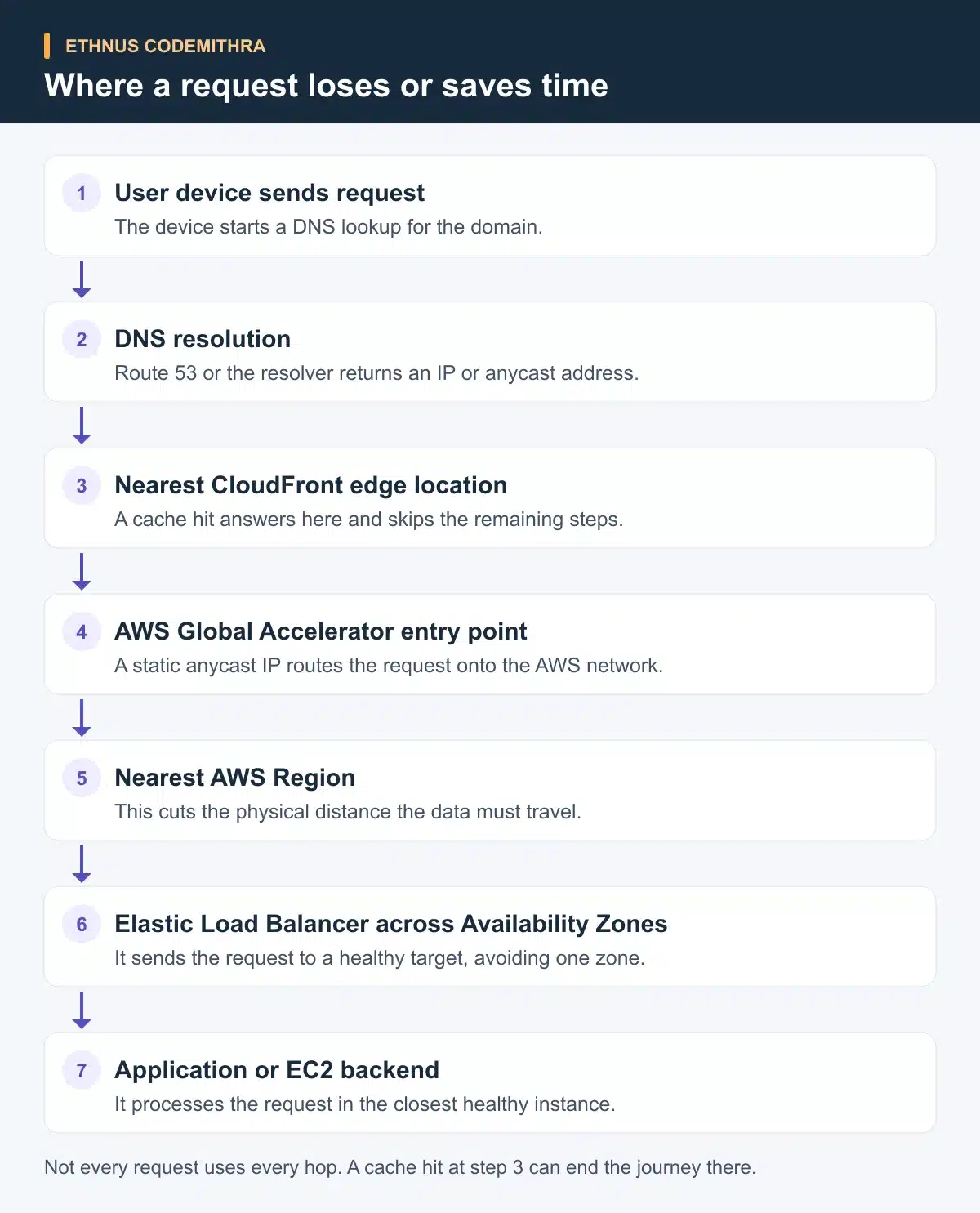
An AWS Region is a physical location made up of multiple data centres, called Availability Zones. These zones stay isolated from each other, but low-latency links connect them. Hosting your application in the Region nearest your users cuts the physical distance a request travels before your code even runs.
The exact number of Regions and Availability Zones keeps changing as AWS adds more. Check the live AWS Global Infrastructure page rather than relying on a fixed figure in this article. Checked against that official page on 8 September 2026. If most of your users sit in India, a Mumbai-region deployment answers requests faster than a US-based one, purely on distance.
Cache at the edge: Amazon CloudFront
Amazon CloudFront is a content delivery network that runs more than 750 globally dispersed points of presence. According to AWS's CloudFront page, it accelerates both static assets and dynamic content, including edge termination, gRPC, WebSockets and compression. When a cached response sits at the nearest edge location, the request never reaches your origin server at all.
Caching alone solves latency well for content that stays the same on every request. Images, video segments, static pages and API responses with a sensible cache window all qualify. It does nothing for a cache miss. It also does nothing for content generated fresh each time. Pair it with the routing and compute choices below for those cases.
Route smarter across regions: AWS Global Accelerator
AWS Global Accelerator gives your application static anycast IP addresses. It routes traffic over the AWS global network to the closest healthy endpoint, without depending on client-side DNS caching. According to AWS's Global Accelerator page, AWS states it can improve network performance for applications by up to 60 percent. That figure comes from AWS itself, not an independent benchmark. Global Accelerator also gives fast failover across Regions and Availability Zones when an endpoint turns unhealthy.
Choose Global Accelerator over CloudFront for traffic that is not cacheable, such as gaming, VoIP or custom TCP and UDP protocols. It also suits cases where you need one fixed IP address that survives failover without a DNS change. Choose CloudFront when the traffic is HTTP or HTTPS content that benefits from caching. Many applications use both, for different parts of their traffic.
Bypass the public internet: AWS Direct Connect
AWS Direct Connect sets up a dedicated network connection between your on-premises infrastructure and AWS. Traffic on that connection stays on the AWS global network and never touches the public internet. According to AWS's Direct Connect page, this reduces the chance of hitting bottlenecks or unexpected latency spikes. Direct Connect can also lower data-transfer costs compared with routing the same traffic over the public internet.
Direct Connect makes sense for a hybrid workload. It moves a heavy or latency-sensitive volume of traffic between your data centre and AWS every day. It is not a fit for a small application with occasional AWS calls. Set it up only once the volume and sensitivity of that traffic justify a dedicated line.
Control traffic and topology inside AWS: VPC and Elastic Load Balancing
Amazon VPC lets you launch AWS resources into a logically isolated virtual network that you define. According to AWS's VPC documentation, that network comes with your own subnets, route tables, gateways and endpoints. A VPC does not reduce latency by itself. What it controls is the path traffic takes. A request might cross a peering connection, use a VPC endpoint to reach another AWS service privately, or take longer routes through unnecessary hops. Design that path deliberately instead of assuming isolation alone helps.
Elastic Load Balancing automatically spreads incoming application traffic across multiple targets in one or more Availability Zones, according to AWS's Elastic Load Balancing page. This keeps a single overloaded server from becoming the bottleneck that adds latency for everyone behind it.
Pick the right compute for latency-sensitive workloads
Some EC2 instance families exist for high network throughput. They use the Elastic Network Adapter, or ENA Express, which supports up to 25 Gbps of single-flow bandwidth. According to AWS's EC2 instance network bandwidth documentation, current families with distinct high-bandwidth behaviour include C8in, C8ine, M8in, M8ine, M8idn, R8in and R8idn. AWS revises instance generations often, so treat this as an example of the category, not a fixed list. Check the live documentation before you choose an instance for a new workload.
Reach for a network-optimised family when your workload pushes sustained high-throughput traffic between instances or to storage. Real-time analytics, video processing and high-volume messaging are common examples. A general-purpose instance is the right default otherwise.
Multi-AZ vs Multi-Region: how far do you need to go
A Multi-AZ deployment spreads your application across two or more Availability Zones inside one Region. It protects against the failure of a single data centre. A load balancer can route around one Availability Zone that goes unhealthy, without adding meaningful latency for users already close to that Region.
A Multi-Region architecture goes further. It runs your application in more than one Region, so users connect to whichever one is closest to them. Reach for Multi-Region only when your users are genuinely spread across continents. It also fits cases where you must tolerate an outage of an entire Region, not just one Availability Zone. This is the largest structural improvement available, and also the most expensive to build and run.
A decision table for the services above
| Service | What it solves | Best used when | Typical latency impact |
|---|---|---|---|
| Amazon CloudFront | Edge caching for static and dynamic content | Global users requesting cacheable content | Large drop on a cache hit, none on a cache miss |
| AWS Global Accelerator | Fast routing and failover across Regions and Availability Zones for non-cacheable TCP or UDP traffic | Multi-Region apps that need deterministic routing without DNS delay | Up to 60 percent improvement, per AWS's own published figure |
| AWS Direct Connect | Predictable private connectivity from on-premises to AWS | Hybrid workloads with heavy or latency-sensitive on-premises to AWS traffic | Removes public-internet variability, no fixed guaranteed number |
| Multi-Region architecture | Serving users spread across continents or tolerating a Region-level outage | Genuinely global user bases | Largest structural improvement, highest operational cost |
Exercise: check your own path today
Open the AWS Global Infrastructure page and find the Region closest to your two largest user groups. Compare that to the Region your application runs in today. If the two differ by more than one continent, that gap is your first latency fix. It is a hosting decision, not a new service to add. Only after closing that gap should you weigh CloudFront, Global Accelerator or Direct Connect against your own traffic pattern, using the table above.
How this connects to Ethnus training
Ethnus's AWS Solutions Architect Associate course runs 320 hours over four weeks. Its syllabus lists "Networking (VPC, Direct Connect)" directly alongside "Scaling and Monitoring: Auto Scaling, ELB, CloudWatch, SNS", the same services this article covers. The course includes lab and sandbox access, trainer-led sessions and a resume workshop. For a broader starting point, the AWS Cloud Practitioner Essentials course covers Availability Zones, CloudFront and edge locations under its Global Infrastructure module. Its Networking module covers VPN, Direct Connect and hybrid deployments. Ethnus reached the milestone of training over 5 lakh students across all its courses.
FAQ
How does AWS's global infrastructure help reduce latency?
Hosting an application in the AWS Region closest to your users cuts the physical distance a request travels. AWS keeps adding Regions and Availability Zones, so check the current infrastructure page rather than a fixed number.
What role does Amazon CloudFront play in reducing latency?
CloudFront caches static and dynamic content at edge locations close to users. A cache hit answers the request without reaching your origin server, according to AWS's CloudFront page.
Should I use Global Accelerator or CloudFront?
Use CloudFront for cacheable HTTP or HTTPS content. Use Global Accelerator for non-cacheable traffic, custom TCP or UDP protocols, or a fixed IP address that survives failover without a DNS change. Many applications use both.
Can AWS Direct Connect improve latency for on-premises systems?
Yes. Direct Connect keeps traffic on the AWS global network instead of the public internet. According to AWS's Direct Connect page, this reduces the chance of latency spikes. It suits hybrid workloads with heavy or sensitive traffic, not occasional calls.
Does using a VPC reduce latency on its own?
No. A VPC controls the network path your traffic takes, such as peering connections and endpoints, according to AWS's VPC documentation. The path you design inside it affects latency, not isolation by itself.
Start applying these choices with a real syllabus behind the theory. Explore Ethnus Codemithra's AWS Solutions Architect Associate course to work through VPC, Direct Connect, ELB and CloudWatch in labs. Or start with AWS Cloud Practitioner Essentials to cover the global infrastructure fundamentals first.