
Yes. Salesforce gives out a free Developer Edition org with Agentforce pre-enabled. Anyone can build an agent there without buying a licence or entering a card. The Trailhead unit on enabling Agentforce and reviewing default subagents and actions confirms this free-org path exists for that purpose. This guide walks through signing up, turning on Agentforce Studio, and assembling one working service agent in an afternoon. Checked against the official Trailhead source on 8 September 2026.
What you are actually building
A service agent is made of two working parts. A subagent, called a topic until an April 2026 rename, is an area of responsibility. Handling shipping questions or password resets are two examples. An action is the thing the agent runs to do something inside that area: a standard action, a Flow, a prompt template, or a custom Apex method. The Trailhead unit above already uses "subagent" in its live text. Salesforce's developer documentation confirms the rename also covers "Topic Selector", now called the Agent Router, with no change to how it behaves.
Expect Salesforce screens and help articles to mix both terms for a while. That is a naming transition, not two different features. This article pairs "subagent (topic)" the first time each concept appears, then settles on the current name.
Step 1: get the free org
Sign up through the Trailhead-linked page for a free Developer Edition org with Agentforce pre-enabled. That link is referenced from the same enablement unit. The form asks for your name and email address, then a username. It confirms the sign-up by email, matching the standard Salesforce Developer Edition flow. Nobody asks for a credit card at any point.
A Salesforce developer blog post describes the redesigned free Developer Edition org as one that "doesn't expire as long as you keep using it." In practice, logging in occasionally keeps the org alive. Leave it untouched for long enough and it can go dormant. Treat it as an active workspace, not a one-time sign-up you forget about.
Step 2: turn on Agentforce Studio
A fresh org does not have Agentforce switched on by default. In Setup, search for "Salesforce Go", then open Agentforce Studio. Select Get Started, then Turn On. This exact click path comes from the Trailhead enablement unit. That single step enables Einstein Setup and Agentforce Agents together. Skip it, and Agentforce Studio stays hidden even in a supported org.
Step 3: look before you build
Before creating anything, open Agentforce Assets in Setup and see what is already there. A fresh org ships with default subagents and actions. Trailhead names "General CRM" as the example subagent worth exploring first. Some defaults depend on which licences the org holds, so do not assume every reader sees an identical list. Reading these defaults first shows you the pattern an agent follows, before you build one from scratch.
Step 4: assemble one subagent and one action
With Agentforce Studio on, build a small, complete agent rather than a partial one. Create one subagent scoped to a single area, such as order status lookups. Attach one standard action to it, following the same practical exercise Trailhead sets out in its quick-start project. Save the agent, then open the built-in test conversation and send it a message that should trigger that action.
Confirm the agent selects the right subagent through the Agent Router. Then confirm it runs the action and replies with a sensible answer. That one subagent plus one action is a small, complete build, not a fragment worth keeping in a portfolio.
Step 5 (stretch): add one custom Apex action
Once the low-code build works, a Trailhead module on agent customisation with Apex covers a custom action built from scratch. This module needs its own dedicated Developer Edition org, requested through a sign-up link inside the module itself. That org already contains Agentforce and sample data, so it is a different org from the plain one you signed up for in Step 1. Do not try to complete this stretch step inside your Step 1 to 4 org. An Apex action for an agent is a custom invocable method. Best practice wraps existing business logic in a class, rather than editing that logic directly. Use @InvocableMethod on the method and @InvocableVariable on its inputs and outputs.
The unit's illustrative example is a weather lookup for a resort-booking agent. The pattern below follows that same shape without copying any official sample. Treat it as a structure to adapt, not code to paste into a production org.
public class LookupOrderStatusAction {
    @InvocableMethod(label='Look up order status', description='Returns the current status for an order number.')
    public static List<Result> run(List<Request> requests) {
        List<Result> results = new List<Result>();
        for (Request req : requests) {
            Result r = new Result();
            // Call an existing service or query method here.
            // Do not duplicate business logic inside this wrapper.
            r.status = OrderService.getStatus(req.orderNumber);
            results.add(r);
        }
        return results;
    }

    public class Request {
        @InvocableVariable(required=true)
        public String orderNumber;
    }

    public class Result {
        @InvocableVariable
        public String status;
    }
}
Add this action inside that dedicated Apex-module org, not the org from Step 4. Register it against a subagent there, then test it the same way. Building the low-code version first means you already know what a correct reply looks like before Apex enters the picture.
How a request actually resolves
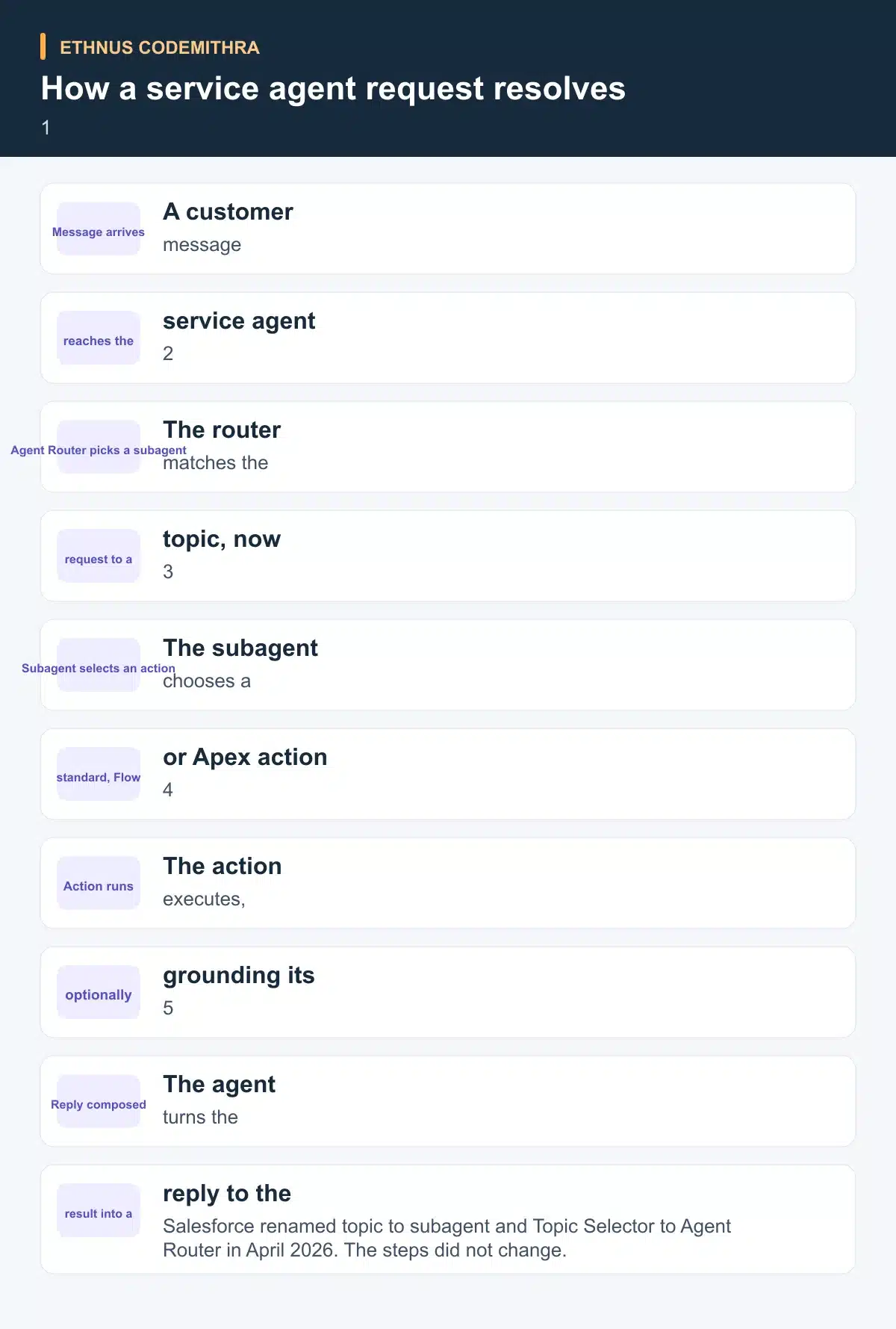
The stages below stay the same whether an action is low-code or Apex. A message comes in, and the Agent Router matches it to a subagent. The subagent picks an action to run. That action can ground its answer on CRM data before the agent composes a reply.
Which action type to build first
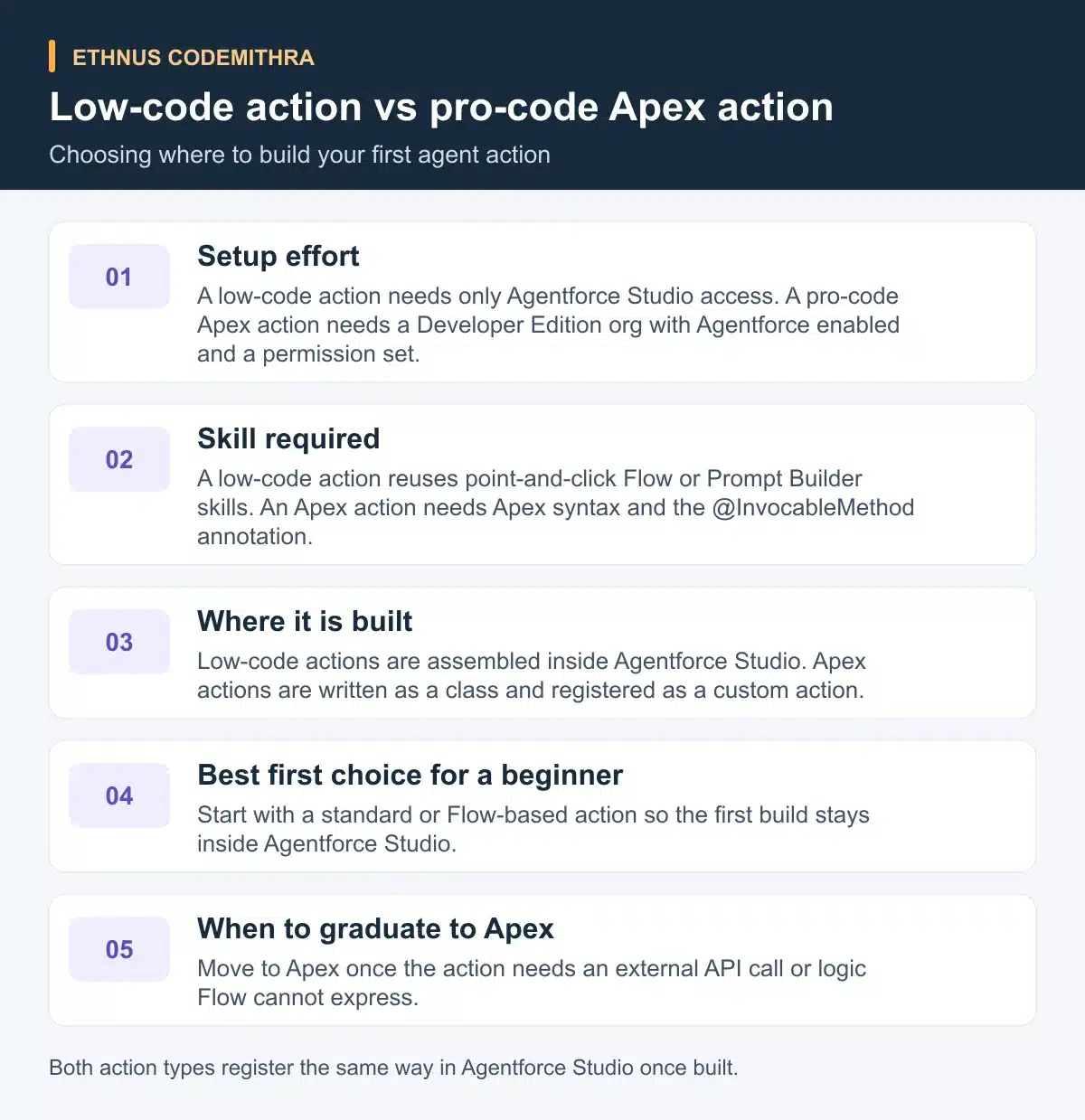
Step 4 and Step 5 above are two ends of the same decision. The table below compares setup effort and skill needed, then shows when to move from one option to the other.
Try it today
Sign up for the free org, turn on Agentforce Studio, and build one subagent with one standard action. Pick a task you already understand, such as checking an order status or a return policy. Test it with three messages: one that clearly matches, one that is ambiguous, and one that belongs to a different subagent. Note which message the Agent Router gets wrong. That single exercise shows more about subagent scoping than reading about it does.
Where to go deeper
This tutorial covers one build, not the full lifecycle. The Design and Implement AI Agents with Agentforce trail runs about eight hours across six modules: Plan, Set Up Your Org, Configure, Test, Deploy, Monitor. It sits at Intermediate level for an Administrator. Treat it as the natural next stop once your first subagent and action work. For a smaller side skill, Quick Start: Prompt Builder is a roughly 20-minute project where you create and test a prompt template. It summarises support cases with generative AI. Prompt Builder is a separate, complementary skill, not part of the service-agent build above.
Where Ethnus fits
Subagents, actions and the Apex wrapper pattern all sit on top of core Salesforce development skills. The Codemithra Salesforce Developer course teaches those fundamentals directly across 200 hours, 15 sections and 84 lessons. Its beginner modules cover Apex basics and Flows. Its intermediate modules add Lightning Web Components and asynchronous Apex. The course page describes trainer-led sessions, lab access for projects and placement assistance. Its current syllabus does not name Agentforce specifically. Its Apex and Flow modules still apply directly here. Treat it as the trainer-led path to the Apex and Flow skills this tutorial assumes, not as an existing Agentforce curriculum. Ethnus also runs a Trailhead-badge event called Salesforce Discovery Day. It is built on eight named foundational badges that end in a shared Trailhead profile, the same badge-earning habit this tutorial relies on.
Common pitfalls
- Leaving the org untouched for too long. A free org that is never opened can go dormant, so log in occasionally even between build sessions.
- Assuming a default subagent or action exists that your org's licence does not include. Trailhead is explicit that some defaults depend on licence type.
- Getting confused by Salesforce's own docs mixing "topic" and "subagent" mid-rename. Both terms describe the same thing during this transition.
- Skipping Step 3. Reviewing an existing subagent such as General CRM before building your own makes the pattern easier to copy correctly.
Frequently asked questions
Do I need a credit card to get the free Agentforce org?
No. Sign-up for the free Developer Edition org with Agentforce pre-enabled does not ask for payment details at any point.
Is Agentforce switched on automatically in a new org?
No. You turn it on yourself in Setup by searching "Salesforce Go", opening Agentforce Studio, and selecting Get Started, then Turn On.
What is the difference between a topic and a subagent?
None functionally. Salesforce renamed "topic" to "subagent" and "Topic Selector" to "Agent Router" in April 2026. Existing agents and their behaviour did not change.
Do I need to write Apex to build a service agent?
No. A standard or Flow-based action is enough for a first build. Apex is a stretch step for actions that need an external API call or logic Flow cannot express.
Does the free org come preloaded with sample data for this build?
Not the org from Step 1. That plain Developer Edition org starts empty. The Step 5 stretch step needs its own dedicated Developer Edition org, and that one does come preloaded with Agentforce and sample data for its Apex exercises. A separate Trailhead project, Explore the Coral Cloud Sample App, provisions yet another sample-data playground, distinct from both orgs above.
Start with a free org and one subagent this week, then move to the Codemithra Salesforce Developer course when you want guided practice with the Apex and Flow skills behind it.