
A new AWS account opened today gets $100 in credit at signup, plus up to $100 more from five named activities, for a total of $200 usable over 6 months (AWS Free Tier, AWS Free Tier change announcement). To avoid a surprise charge, set a cost budget and a billing alarm before you launch any resource, covered in full below. This replaced the old 12-months-free structure on 15 July 2025. So "750 free EC2 hours" or "5 GB of free S3 storage" no longer applies to any account created after that date. Checked against the official AWS Free Tier pages on 8 September 2026.
Which account do you actually have
Before anything else, check when your AWS account was created. That date decides which rules govern your first few months. Confusing the two is the most common reason a new student expects a free resource that no longer exists.
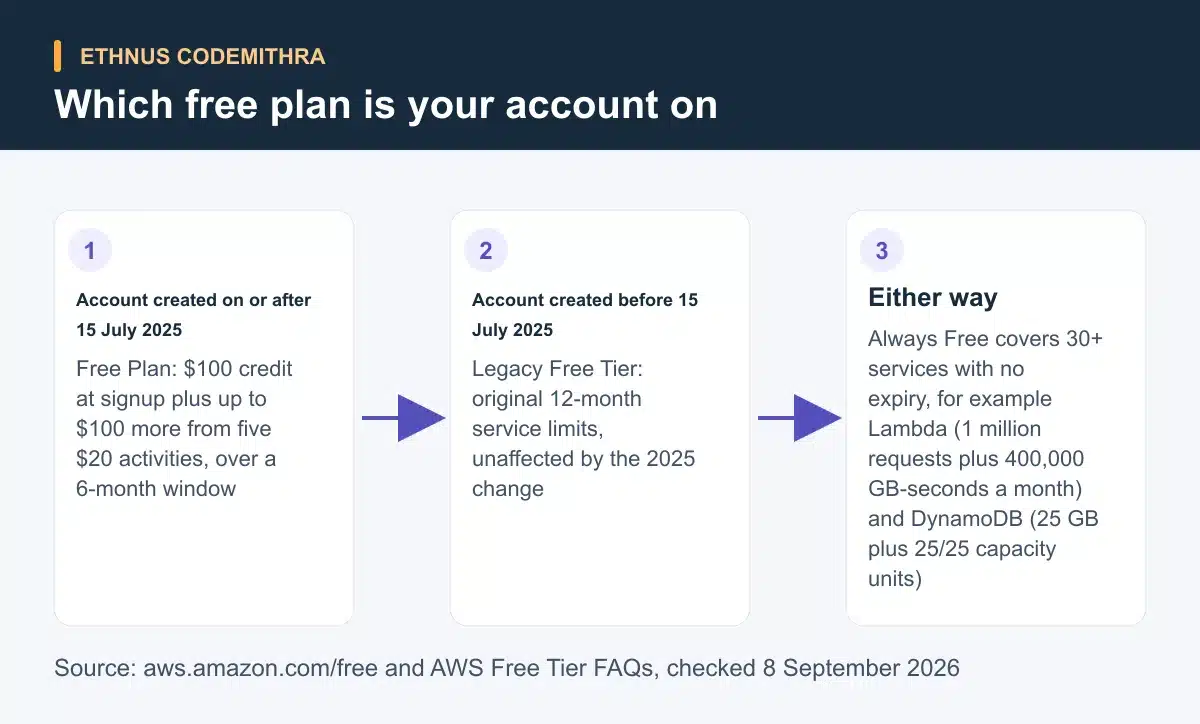
If you created your account on or after 15 July 2025, you are on the new credit-based Free Plan. If your account predates that, you remain on the Legacy AWS Free Tier, and the 2025 change does not affect you at all (AWS Free Tier FAQs).
What a brand-new account gets today
On the Free Plan, AWS credits $100 to your account as soon as you sign up. You can earn up to $100 more, in $20 increments, by completing five named activities (earning additional credits). The five are: launch and terminate an EC2 instance, create an RDS database, build a Lambda web app with a function URL, try a prompt in the Amazon Bedrock playground, and set up a cost budget in AWS Budgets. Do the Budgets activity first. It also builds the cost-monitoring habit this article covers later.
The whole plan expires 6 months after account creation, or when the $200 in credits runs out, whichever comes first (Control your AWS costs). If your account predates 15 July 2025, none of this applies to you. Your original Legacy Free Tier benefits continue unchanged (AWS Free Tier FAQs).
| Point | Legacy Free Tier (before 15 July 2025) | Free Plan (from 15 July 2025) |
|---|---|---|
| Headline benefit | Fixed monthly service limits, for example EC2 and RDS hours, for 12 months | $100 credit at signup plus up to $100 more from five $20 activities |
| Duration | 12 months from account creation | 6 months from account creation, or until credits run out |
| What happens at expiry | Legacy limits end. Only paid usage and Always Free allowances continue | Account closes after a 90-day grace period unless upgraded to a paid plan |
| Source | AWS Free Tier FAQs | AWS Free Tier change announcement |
What never expires: Always Free allowances
Separate from either plan, more than 30 AWS services carry an Always Free monthly allowance that never expires. It applies whether the account runs the Free Plan, the Legacy Free Tier, or a fully paid plan (AWS Free Tier FAQs). Learn this layer well. It keeps working after your credits or 6-month window end.
Two examples matter for a student practising the services an AWS course covers. AWS Lambda's Always Free allowance is 1 million requests and 400,000 GB-seconds of compute a month (AWS Lambda pricing). Amazon DynamoDB's Free Tier allowance is 25 GB of storage plus 25 provisioned write and 25 provisioned read capacity units per Region (Amazon DynamoDB pricing). AWS describes that as enough for roughly 200 million requests a month. Both cover a genuine practice project without touching your $200 in credit.
What happens when the credits or the 6 months run out
If you do not upgrade to a paid plan before the Free Plan ends, your account is not deleted immediately. AWS gives you a 90-day grace period first. If you still have not upgraded after that, it closes the account and permanently erases its data (AWS Free Tier FAQs). Treat the 90 days as a deadline to export your work, not as extra free time.
A four-step checklist to avoid a surprise charge
Set this up in your first session, before you launch a single lab resource. None of these steps cost money, and the first one also earns part of your $100 activity credit.
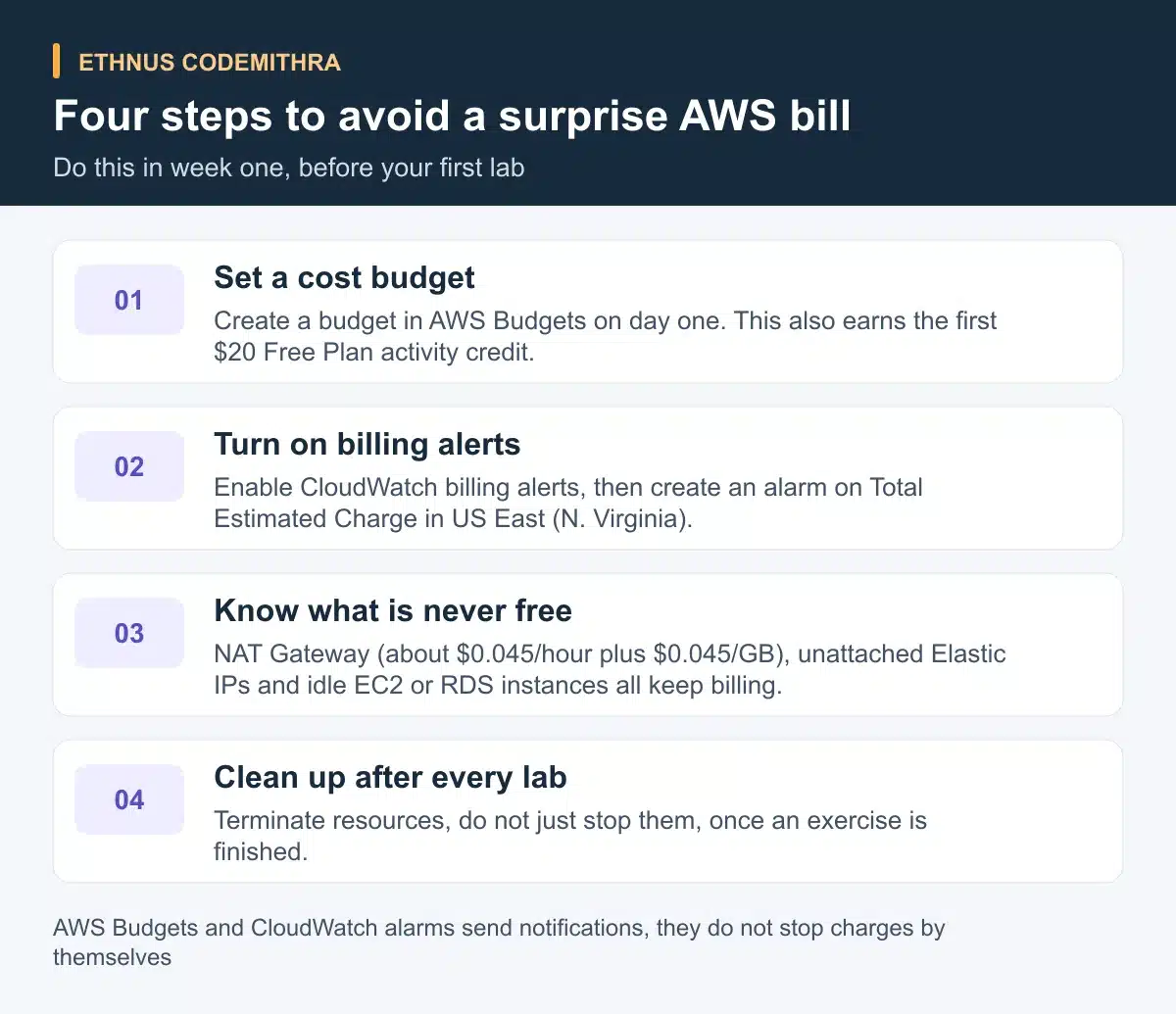
- Set a cost budget in AWS Budgets. Create a budget on day one so you get email notifications as spending approaches a threshold you choose. This also completes one of the five $20 Free Plan activities (managing your costs with AWS Budgets).
- Turn on CloudWatch billing alerts and create an alarm. Enable billing alerts first, then build a CloudWatch alarm on the Total Estimated Charge metric. That metric only exists in the US East (N. Virginia) Region, even though it reflects your worldwide spending (create a billing alarm).
- Know what is never free. A NAT Gateway carries no Free Tier or Always Free allowance. It charges about $0.045 per hour it exists plus $0.045 per GB it processes (Amazon VPC pricing). An unattached Elastic IP or an EC2 or RDS instance left running after a lab behaves the same way.
- Clean up after every lab. Terminate resources you no longer need, rather than only stopping them. A stopped EC2 instance can still carry attached storage and IP charges.
Neither AWS Budgets nor a CloudWatch alarm stops a charge from happening. Both are notification tools, and both can lag behind actual usage (managing your costs with AWS Budgets). The habit of checking and cleaning up matters more than any single alert.
Try it: check your own account
Open the AWS Billing console now and look up your account's creation date. Note whether you are on the Free Plan or the Legacy Free Tier. Then complete step one of the checklist above: create a cost budget before you open any other AWS service. This takes under 10 minutes and removes the single biggest risk of an unattended resource turning into a bill.
How this fits an Ethnus AWS course
Account setup and cost control come first in any AWS course, before compute or storage modules make sense. Ethnus's AWS Cloud Practitioner Essentials course covers an 11-module foundations syllabus. It includes Compute in the Cloud, Storage and Databases, and Pricing and Support, backed by lab and sandbox access with unlimited attempts and trainer-led sessions for instant doubt clearing. That structure gives a student a safe place to repeat the checklist above until it becomes routine.
Once you are comfortable with account setup and the free allowances, go further. The AWS Solutions Architect Associate course extends the same lab access into Lambda, S3, IAM, DynamoDB and CloudWatch, the exact services named in the Always Free examples above.
Frequently asked questions
Do I still get 750 free EC2 hours a month?
Only if your account was created before 15 July 2025 and remains on the Legacy Free Tier. A new account instead gets $200 in credit and the Always Free allowances (AWS Free Tier FAQs).
What happens if I do not use all $200 in credit?
Unused credit does not carry forward past 6 months from account creation. The Free Plan ends at 6 months or when the credit runs out, whichever comes first (Control your AWS costs).
Will AWS Budgets stop a charge before it happens?
No. AWS Budgets sends a notification once actual or forecast spending crosses a threshold you set. It does not block a charge by itself, and it can lag behind real usage (managing your costs with AWS Budgets).
Why does my NAT Gateway keep charging me on the Free Plan?
NAT Gateway has no Free Tier or Always Free coverage. It bills from the moment it exists, about $0.045 an hour plus $0.045 per GB processed, on any account type (Amazon VPC pricing).
What happens to my account if I never upgrade to a paid plan?
AWS gives you a 90-day grace period after the free period ends. If you have not upgraded by then, it closes the account and permanently erases its data (AWS Free Tier FAQs).
Start your first week the right way with Ethnus's AWS Cloud Practitioner Essentials course. Account setup and cost control come before the compute and storage modules, with lab access to practise both.