
Pick an S3 storage class by matching it to how often the data gets read, not by memorising a list. S3 Standard suits data you read often. The infrequent-access and Glacier classes trade a lower storage price for a retrieval fee. Some also add a minimum storage duration or a longer wait to read the object. A lifecycle policy then moves an object between classes automatically as it ages. You set the rule once, instead of reclassifying objects by hand.
This matters for the AWS Certified Solutions Architect - Associate (SAA-C03) exam. Domain 4, "Design cost-optimized architectures," is 20 percent of the exam. Its first task statement lists "managing S3 object lifecycles" and "selecting the appropriate storage tier" as explicit skills. The exam guide names Amazon S3 and Amazon S3 Glacier as the in-scope services. It does not enumerate a fixed number of storage classes. Treat any claim of "six classes" with caution, and check the class names instead. Checked against the official SAA-C03 exam guide on 8 September 2026.
The storage classes that matter for this exercise
Seven classes cover almost every access pattern a candidate needs to reason about. Each one trades availability, durability, minimum storage duration or minimum billable object size for a lower storage price. The figures below come from the AWS S3 storage class comparison table.
- S3 Standard. The default class if you do not specify one. No minimum storage duration and no minimum object size.
- S3 Standard-IA. Same millisecond access as Standard, but with a per-GB retrieval fee. Minimum storage duration of 30 days and a minimum billable object size of 128 KB.
- S3 One Zone-IA. Same pricing shape as Standard-IA, stored in a single availability zone. It is not resilient to the loss of that zone.
- S3 Intelligent-Tiering. No retrieval fees. A small per-object monitoring fee, and the service moves objects between access tiers for you.
- S3 Glacier Instant Retrieval. Millisecond access at archive prices, with a 90-day minimum storage duration and a 128 KB minimum billable object size.
- S3 Glacier Flexible Retrieval. Retrieval takes minutes to hours, and an object must be restored before you can read it. Minimum storage duration is 90 days.
- S3 Glacier Deep Archive. The lowest storage price, with a 180-day minimum storage duration and a restore step measured in hours.
Two more classes exist outside this mainstream path. S3 Express One Zone is a single-zone, high-performance class used with directory buckets for latency-sensitive workloads. Reduced Redundancy Storage is explicitly marked "not recommended" by AWS and carries lower durability than every other class. A separate Outposts-only class exists for buckets on Outposts hardware and cannot be used on a Region bucket. None of the three fit the lifecycle exercise in this article, so they are mentioned here and set aside.
Comparison table
Use this table to match an access pattern to a class before you write a lifecycle rule. Values are verbatim from the AWS storage class comparison table. Do not substitute the availability figures on AWS marketing pages, which round differently.
| Storage class | Designed for | Availability (designed for) | Durability | Min. storage duration | Min. billable object size | Retrieval |
|---|---|---|---|---|---|---|
| S3 Standard | Frequently accessed data | 99.99% | 99.999999999% | None | None | Milliseconds, no retrieval fee |
| S3 Standard-IA | Infrequent access, rapid when needed | 99.9% (3+ AZs) | 99.999999999% | 30 days | 128 KB | Milliseconds, per-GB retrieval fee |
| S3 One Zone-IA | Infrequent access, re-creatable data | 99.5% (1 AZ) | 99.999999999% | 30 days | 128 KB | Milliseconds, per-GB retrieval fee |
| S3 Intelligent-Tiering | Unknown or changing access patterns | 99.9% | 99.999999999% | None | None | Milliseconds, no retrieval fee, small monitoring fee |
| S3 Glacier Instant Retrieval | Archive data read about once a quarter | 99.9% (3+ AZs) | 99.999999999% | 90 days | 128 KB | Milliseconds, per-GB retrieval fee |
| S3 Glacier Flexible Retrieval | Archive data, occasional retrieval | 99.99% (after restore) | 99.999999999% | 90 days | None stated | Minutes to hours, after a restore |
| S3 Glacier Deep Archive | Long-term archive, rarely read | 99.99% (after restore) | 99.999999999% | 180 days | None stated | Hours, after a restore |
Storing an object smaller than the minimum billable object size still works. AWS bills it as if it were that minimum size. Very small objects rarely save money by moving to an infrequent-access or Glacier class.
How Intelligent-Tiering actually moves data
S3 Intelligent-Tiering removes the need to pick a class up front. It monitors access and moves each object between tiers on its own. An object starts in the Frequent Access tier. After 30 consecutive days with no access, it moves to the Infrequent Access tier. After 90 days with no access, it moves to the Archive Instant Access tier, all without a retrieval fee. See the AWS documentation on how S3 Intelligent-Tiering works.
You can also opt in to two deeper archive tiers. Archive Access holds objects untouched for 90 or more days. Deep Archive Access holds objects untouched for 180 or more days. Standard retrieval from Archive Access takes 3 to 5 hours. Standard retrieval from Deep Archive Access completes within 12 hours. One limit to remember: objects under 128 KB are never monitored or moved. They stay in the Frequent Access tier regardless of age.
Lifecycle policy diagram and worked example
A lifecycle rule automates the class changes above, but the transitions only run one way, in a fixed waterfall. You cannot write a rule that moves an object back to a cheaper-to-read class. Some classes can only transition to one specific destination.
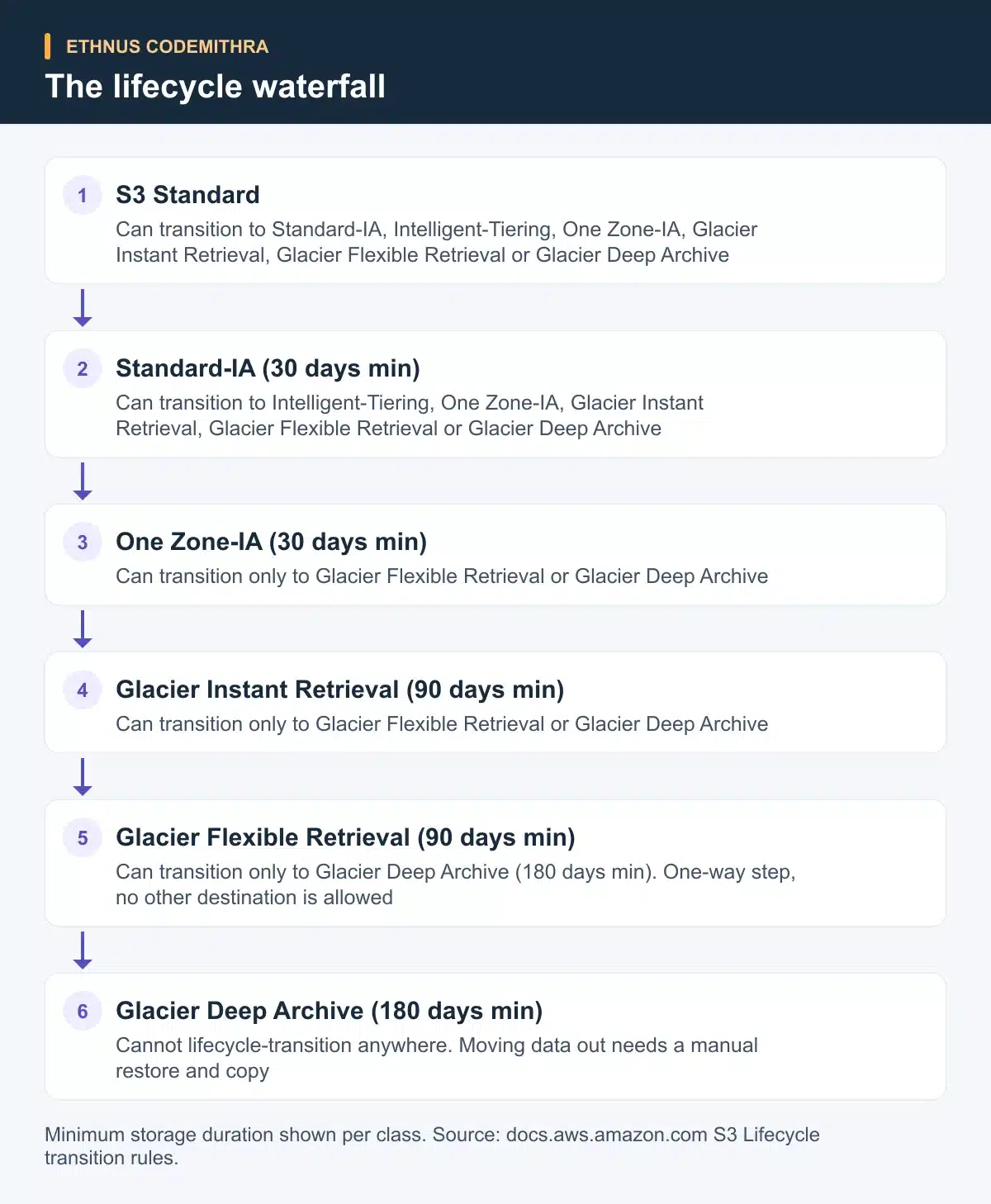
S3 Glacier Flexible Retrieval can transition only to S3 Glacier Deep Archive. S3 Glacier Deep Archive cannot transition anywhere at all. Moving data out of either class needs a manual restore followed by a copy, not a lifecycle rule.
The minimum storage duration also constrains how soon a second transition can fire. AWS gives this example. A rule cannot move an object to Glacier Instant Retrieval at day 4, then to Deep Archive at day 20. Glacier Instant Retrieval's 90-day minimum means the Deep Archive transition must occur at day 94 or later. Read this in the transition rules documentation before you set transition days in a rule.
Try this exercise with a test bucket. Write a rule that moves objects from Standard to Standard-IA at 30 days, then to Glacier Deep Archive at 180 days. Add a size filter so objects under 128 KB stay excluded from the transition, rather than follow the platform default.
{
  "Rules": [
    {
      "ID": "standard-to-ia-to-deep-archive",
      "Status": "Enabled",
      "Filter": {
        "And": {
          "Prefix": "logs/",
          "ObjectSizeGreaterThan": 131072
        }
      },
      "Transitions": [
        {
          "Days": 30,
          "StorageClass": "STANDARD_IA"
        },
        {
          "Days": 180,
          "StorageClass": "DEEP_ARCHIVE"
        }
      ]
    }
  ]
}
Apply it with the AWS CLI once the JSON above is saved as lifecycle.json:
aws s3api put-bucket-lifecycle-configuration \
  --bucket your-test-bucket \
  --lifecycle-configuration file://lifecycle.json
This is an original exercise for practice, not a description of a specific Ethnus batch lab. Run it against a disposable test bucket and confirm the rule with aws s3api get-bucket-lifecycle-configuration.
Common exam and real-world traps
- Early transition and deletion charges. Deleting, overwriting or transitioning an object before its minimum storage duration elapses still bills the remaining days. See the storage class documentation for each class's rate.
- Glacier metadata overhead. Archiving an object to Glacier Flexible Retrieval or Glacier Deep Archive adds 40 KB of per-object metadata overhead. That overhead bills 32 KB at the Glacier rate and 8 KB at the S3 Standard rate. Archiving many small objects costs more than archiving fewer, larger ones.
- Tag-based filters run on a delay. A lifecycle rule filtered by tag is evaluated daily. The queued transition then executes asynchronously, re-checking the tag at execution time. Removing a tag does not guarantee you cancel a transition that is already queued.
- The September 2024 small-object default changed. Since September 2024, S3 Lifecycle's default behaviour blocks objects smaller than 128 KB from transitioning to any storage class. Before that change, small objects could still transition to the two Glacier classes by default. A configuration created before the change keeps the old default until you edit it. Check when a rule was created before assuming which behaviour applies. Add an
ObjectSizeGreaterThanorObjectSizeLessThanfilter to control this explicitly, as in the sample rule above. See the transition rules documentation for the exact wording of this change.

How this fits Ethnus training
The Codemithra AWS Solutions Architect - Associate course lists "Introduction to Storage - EBS, S3" under its AWS Foundational Services syllabus section. That is where a storage class decision like this one first comes up. The course includes lab and sandbox access with step-by-step walkthroughs. You can build a test bucket there and run the lifecycle exercise above instead of only reading about it. Trainer-led sessions and quizzes run alongside the labs. The program adds a resume workshop and practice interviews as part of its career-support track. Try the exercise on your own account first, then bring the questions it raises into a live session.
Practical takeaway
Use this checklist before you write a lifecycle rule.
- Data read daily or unpredictably: keep it in S3 Standard, or move to Intelligent-Tiering if the pattern is unclear.
- Data read a few times a month, needs millisecond access: S3 Standard-IA, or One Zone-IA if an availability zone failure is an acceptable risk.
- Archive data read about once a quarter, needs millisecond access: S3 Glacier Instant Retrieval.
- Archive data read a few times a year, minutes-to-hours retrieval is acceptable: S3 Glacier Flexible Retrieval.
- Archive data kept mainly for compliance, read rarely if ever: S3 Glacier Deep Archive.
- Check the source class's minimum storage duration before setting a transition day, so the next step is not too early.
Build this into a working habit inside a full AWS architecture course. Start with the AWS Solutions Architect - Associate program at Codemithra. There, S3 sits alongside EC2, IAM and the other services this domain covers.
Frequently asked questions
How many S3 storage classes does the SAA-C03 exam guide list?
The exam guide does not list a specific number. It names Amazon S3 and Amazon S3 Glacier as in-scope services under Domain 4. Listed skills there include "managing S3 object lifecycles" and "selecting the appropriate storage tier."
Can a lifecycle rule move an object out of Glacier Deep Archive?
No. Glacier Deep Archive cannot lifecycle-transition to any other class. Moving an object out requires a manual restore followed by a copy to a different class or bucket.
Why did my small object not move to Glacier as expected?
Since September 2024, S3 Lifecycle's default behaviour excludes objects smaller than 128 KB from any transition. Add an ObjectSizeGreaterThan filter if you want smaller objects included, or check whether the rule predates the change.
Does S3 Intelligent-Tiering remove the need to choose a class?
It removes the need to guess an access pattern up front. It monitors each object and moves it between tiers automatically. Objects under 128 KB are excluded from monitoring and stay in the Frequent Access tier.
Is S3 Standard-IA less durable than S3 Standard?
No. Both are designed for 99.999999999% durability. The difference is availability and cost: Standard-IA carries a lower designed availability and a per-GB retrieval fee in exchange for a lower storage price.