Apex looks like Java at first glance. Salesforce's own Trailhead guide to Apex calls it a language with "Java-like syntax" built on "familiar Java idioms". But Apex is a separate, hosted language. It runs only inside the Salesforce Platform, with database access and per-transaction limits built into the language itself. Your Java knowledge of classes, interfaces and control flow carries over. The execution model, the database access style and the per-transaction rules do not.
What actually carries over from Java
Apex is object-oriented in the same way Java is. Trailhead states plainly that "Apex supports classes, interfaces, and inheritance". If you already think in classes, interfaces and inheritance, that structure still applies in Apex.
The block syntax is familiar too. Curly braces, semicolons, if and for statements, and method signatures all read the way they do in Java. Salesforce frames Apex as built on "familiar Java idioms," not as an unrelated language. You do not need to relearn your instinct for structuring a program.
Concrete syntax and behaviour differences
The differences start small, but they catch a Java developer off guard. Java treats myAccount and MyAccount as two different names. Apex does not. Trailhead confirms that "Apex is a case-insensitive language". A variable and a type that differ only in case can clash in Apex. That never happens in Java.
The bigger differences are structural. The table below lists the five that matter most when you move from writing Java to writing Apex.
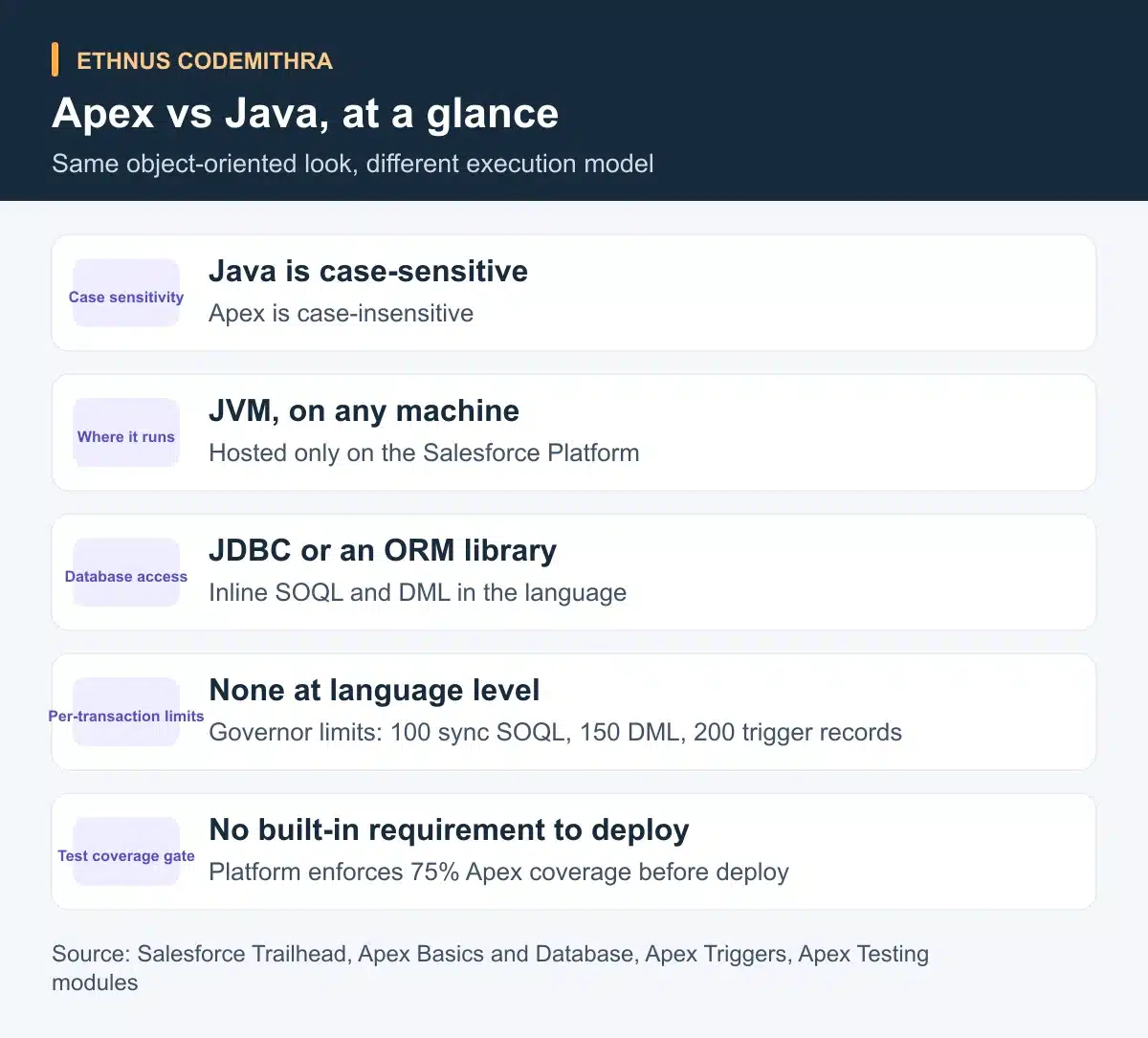
| Aspect | Java | Apex |
|---|---|---|
| Case sensitivity | Case-sensitive | Case-insensitive |
| Where it runs | Any machine with a JVM | Hosted, saved, compiled and run on the Salesforce Platform |
| Database access | A separate driver or ORM, such as JDBC or Hibernate | SOQL and DML embedded directly in the language |
| Per-transaction limits | None at the language level | Governor limits: up to 100 synchronous SOQL queries and 150 DML statements per transaction |
| Deployment test-coverage gate | No built-in requirement to compile or run | At least 75 percent of Apex code must pass test coverage before deployment |
Look closely at the database row. In Java, reading a record means opening a connection and writing SQL as a string. You map the result back into objects yourself, or you configure an ORM to do it. In Apex, a SOQL query sits inside square brackets as part of the code itself. For example: Account[] accts = [SELECT Name, Phone FROM Account]. Trailhead's page on querying records with SOQL notes that "you can embed SOQL queries in your Apex code and get results in a straightforward fashion."
Data manipulation works the same way. Statements such as insert, update, upsert, delete, undelete and merge are part of the language, not library calls. Trailhead's guide to DML points out that Apex removes "additional setup to connect to data sources" that other languages need.
Why Apex has governor limits at all
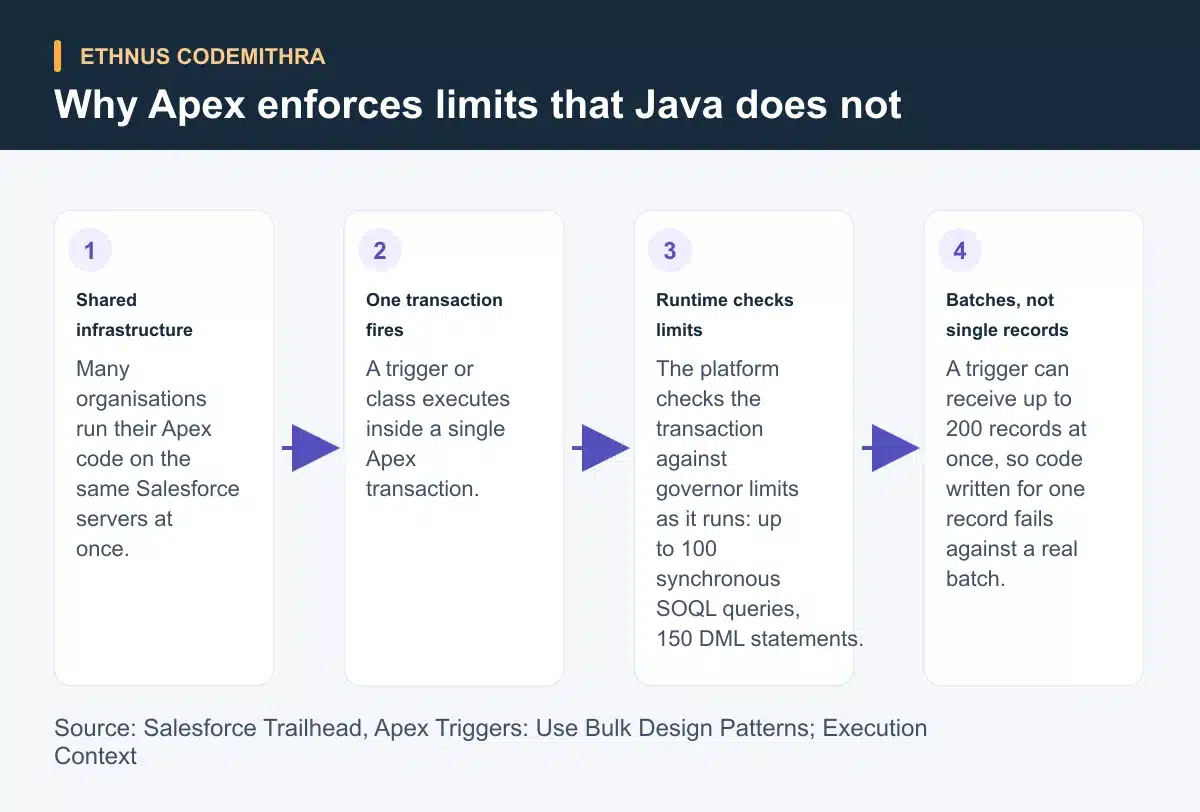
Governor limits are the part of Apex with no real Java equivalent. Trailhead's module on bulk design patterns explains that "Apex runs in a multitenant environment". The limits make sure "runaway code doesn't monopolize resources on the multitenant platform". Many organisations run their code on the same shared Salesforce infrastructure at the same time. No single transaction gets to run unchecked.
Two figures are worth remembering. Synchronous Apex allows up to 100 SOQL queries and up to 150 DML statements in one transaction. A second Trailhead page on execution context repeats the same figures independently. That same page adds that an Apex trigger "can receive up to 200 records at once". A Java web handler processes one request at a time. It has no such ceiling to plan around. Apex code does.
A minimal code comparison
The same task, fetching a customer's phone number, looks different in each language. The Java side below is a short JDBC-style sketch, not a complete program.
// Java, illustrative JDBC-style call
String sql = "SELECT phone FROM accounts WHERE name = ?";
PreparedStatement stmt = connection.prepareStatement(sql);
stmt.setString(1, "Acme");
ResultSet rs = stmt.executeQuery();
if (rs.next()) {
    String phone = rs.getString("phone");
}
// Apex, inline SOQL, no separate connection setup
Account[] accts = [SELECT Name, Phone FROM Account WHERE Name = 'Acme'];
if (!accts.isEmpty()) {
String phone = accts[0].Phone;
}Writing records shows the same contrast. A bulk-safe Apex insert acts on a list. It does not loop through one record at a time:
// Apex, bulk-safe DML on a list of records
List<Account> accountsToUpdate = new List<Account>();
for (Account acc : [SELECT Id, Rating FROM Account WHERE Rating = null]) {
    acc.Rating = 'Warm';
    accountsToUpdate.add(acc);
}
update accountsToUpdate;
These snippets are teaching examples. They illustrate the syntax difference, not a specific Ethnus lab exercise.
The practical habit Apex requires that Java web code doesn't
A trigger can receive up to 200 records in one call. So Apex trigger code has to assume a batch from the first line, not a single record. Place a SOQL query or DML statement inside a loop over the trigger's records, and it runs once per record. With 200 records, that can burn through the 100-query or 150-DML ceiling before the transaction finishes.
Bulkified code avoids this. Move queries and DML statements outside the loop. Collect the work into lists, then run one query and one DML statement against the whole batch. Trailhead describes this style as code that "can process large numbers of records efficiently and run within governor limits". A Java servlet handling one HTTP request rarely needs this discipline. It is not routinely handed 200 records inside a single method call. Apex trigger code is.
Try this today: take any Apex trigger sample with a query or DML statement inside a loop. Rewrite it so the query runs once before the loop. Run the DML statement once after the loop, on a list. That single change separates code that works on one test record from code that survives a 200-record data load.
Testing is a deployment gate, not just good practice
In Java, you can compile and run code with zero test coverage. Nothing in the language stops you. Apex is different. Trailhead's module on Apex testing states that "at least 75% of Apex code must be covered by tests, and all those tests must pass". It adds that every trigger needs "some coverage". Salesforce's own help documentation confirms the same figures for a production deploy. That figure is at least 75 percent unit test coverage, with "at least one line of test coverage" on every trigger.
Salesforce enforces this before code reaches production. It is not a suggestion. A Java project can add a coverage check to its build pipeline. A team has to configure that check itself. Apex works differently. The Salesforce Platform checks the 75 percent threshold and the per-trigger coverage directly, at the point of deployment.
Where this fits an Ethnus learning path
Say you already have Java fundamentals, for example from Ethnus's JaWEsome course. It runs "160+ Hours" and covers Core Java topics such as "Datatypes (with memory allocation), Variables, Operators". A second module covers object-oriented programming: classes, encapsulation, packages, inheritance and polymorphism. That syntax groundwork carries straight into Apex. What JaWEsome does not cover is the Salesforce-specific half: SOQL, DML, governor limits and the deployment test-coverage gate above.
The Codemithra courses page describes its Salesforce Developer course as "authorised by Salesforce". It lists the course at ₹35,999. The listing shows 654 students enrolled and a 4.6 rating. For a reader who already writes Java, this is the natural next step. It builds on your object-oriented instincts. It then adds Apex's hosted execution model, inline SOQL and DML, and its governor limits and coverage rules.
Conclusion
Apex reads like Java. Classes, interfaces, inheritance and familiar block syntax all carry over directly. What does not carry over is the execution model. Apex is case-insensitive, runs only on the Salesforce Platform, and embeds SOQL and DML directly in the language. It also enforces governor limits on every transaction and blocks production deployment below 75 percent test coverage. Bulk-safe code and the coverage gate separate "code that looks like Java" from code built for a multitenant platform.
Start with Ethnus's Salesforce Developer course if you already have Java fundamentals and want to build on them directly. Start with JaWEsome first if your Java is still developing.
Frequently asked questions
Is Apex a version of Java?
No. Apex uses Java-like syntax and idioms, but it is a separate language. Salesforce saves, compiles and runs it on its own platform, not on a general-purpose JVM, according to Trailhead.
Can I run Apex code outside Salesforce?
No. Apex is hosted. Salesforce saves, compiles and executes it on the server, the Salesforce Platform. It does not run as a standalone program the way a Java application does.
What happens if my Apex trigger only handles one record at a time?
It can pass a quick test and still fail once real data arrives. A trigger can receive up to 200 records in one call. A query or DML statement placed inside a per-record loop can then exceed the transaction's governor limits.
Do I need 100 percent test coverage to deploy Apex code?
No. The requirement is at least 75 percent of Apex code covered by passing tests. Every trigger needs some coverage too, before deployment to production.
Should I learn Java before learning Apex?
It helps. Apex follows familiar Java idioms for its structure and block syntax. Existing Java fundamentals cut down what you need to learn about basic syntax. You can then focus on Apex-specific ideas such as SOQL, DML and governor limits.