
To add login and protected routes to a MERN project, you do not need a full authentication framework. You need three working pieces, and this guide builds each one with real code.
- A User model that hashes every password with bcryptjs before MongoDB stores it.
- A login route that checks the password and signs a JSON Web Token.
- A middleware function that verifies the token before a protected route runs.
The guide also covers one decision most tutorials skip: where the token should live in the browser. It stops short of refresh-token rotation and social login. Role-based permissions are out of scope too. Each of those builds on the same foundation described here.
What a JWT actually contains
A JSON Web Token has three parts. They are joined by dots and encoded in Base64URL. On the wire it looks like xxxxx.yyyyy.zzzzz. The three parts are a header, a payload, a signature (jwt.io).
The header names the token type and the signing algorithm, for example {"alg":"HS256","typ":"JWT"}. The payload carries claims. Registered claims include exp for expiry, iss for issuer, sub for subject, aud for audience (jwt.io).
Base64URL encoding is not encryption. Anyone holding the token can decode the payload and read it. A token must never carry a password, an API key or anything else meant to stay private (jwt.io).
You can sign a JWT with a shared HMAC secret, such as HS256. Or you can sign it with an RSA or ECDSA key pair (jwt.io). This guide uses HS256, with a secret in an environment variable, which suits a single backend service.
jwt.io calls a JWT a stateless mechanism only "in certain cases", not always. Treat that as something you design for, not something you get for free (jwt.io).
The User model
Start with a Mongoose schema for the user. Hash the password before you save it, using a pre('save') hook and the bcryptjs package.
const mongoose = require('mongoose');
const bcrypt = require('bcryptjs');

const userSchema = new mongoose.Schema({
  email: { type: String, required: true, unique: true, lowercase: true, trim: true },
  password: { type: String, required: true, minlength: 8 },
});

userSchema.pre('save', async function hashPassword(next) {
  if (!this.isModified('password')) return next();
  this.password = await bcrypt.hash(this.password, 10);
  next();
});

module.exports = mongoose.model('User', userSchema);
Two details here matter more than they look. First, always pass the rounds argument to the async bcrypt.hash() call, as the code above does. Without it, bcrypt.hash() throws an error instead of falling back to a default. The default of 10 rounds documented in the bcryptjs README applies to hashSync() and genSalt(), not to the async hash() used here (bcrypt.js README). bcryptjs is a pure JavaScript implementation. That is slower than a native binding, but it installs without a compiler toolchain, which suits a first project.
Second, unique: true on the email path is not a validator. The Mongoose documentation calls it "a convenient helper for building MongoDB unique indexes" (Mongoose validation docs). A duplicate email fails as a MongoDB driver error, not a ValidationError. Your register route needs to catch both error shapes on their own terms, shown next.
Register and login routes
The register route below relies on the schema above to hash the password. It then handles the two failure modes separately.
router.post('/register', async (req, res) => {
  try {
    const user = await User.create({ email: req.body.email, password: req.body.password });
    res.status(201).json({ id: user._id, email: user.email });
  } catch (err) {
    if (err.code === 11000) {
      return res.status(409).json({ error: 'An account with this email already exists.' });
    }
    if (err.name === 'ValidationError') {
      return res.status(400).json({ error: err.message });
    }
    res.status(500).json({ error: 'Registration failed.' });
  }
});
A duplicate key in MongoDB carries code: 11000. A failed Mongoose validator carries name: 'ValidationError'. Those are two different error shapes, so the route checks each one on its own (Mongoose validation docs).
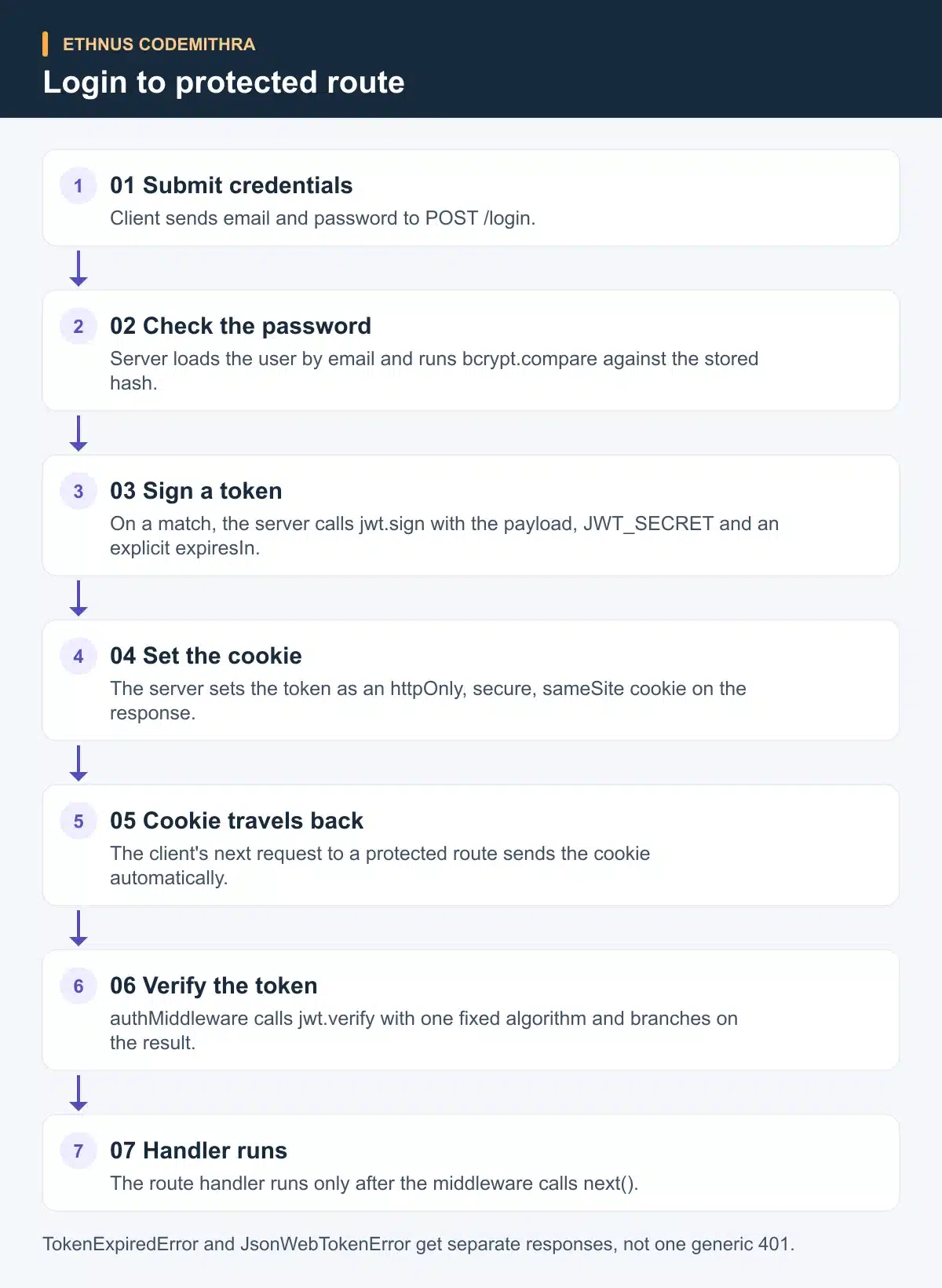
Login compares the submitted password against the stored hash. On a match, it signs a token with an explicit expiry.
router.post('/login', async (req, res) => {
  const user = await User.findOne({ email: req.body.email });
  if (!user) return res.status(401).json({ error: 'Invalid email or password.' });

  const passwordMatches = await bcrypt.compare(req.body.password, user.password);
  if (!passwordMatches) return res.status(401).json({ error: 'Invalid email or password.' });

  const token = jwt.sign(
    { sub: user._id.toString() },
    process.env.JWT_SECRET,
    { algorithm: 'HS256', expiresIn: '1h' }
  );

  res
    .cookie('token', token, { httpOnly: true, secure: true, sameSite: 'strict' })
    .status(200)
    .json({ email: user.email });
});
jsonwebtoken defaults to HS256 when no algorithm is set (node-jsonwebtoken README). Naming it here is a habit worth keeping, not a strict requirement in this one call. expiresIn takes either a number of seconds or a time-span string. A plain JavaScript number is always parsed as seconds. A numeric string with no unit, such as '120', is parsed as milliseconds instead. Always give it an explicit unit, such as '1h', to avoid that trap.
The JWT_SECRET itself needs real entropy. OWASP recommends generating an HMAC secret with a secure generator, with at least 160 bits of entropy, at least as long as the HMAC output (OWASP JWT Cheat Sheet). That rules out a short or memorable string.
Issuing the token safely
The login route above sets the token as a cookie. It does not return the token in the JSON body. That is a deliberate choice, not a style preference.
OWASP's session management guidance is clear on this point. Tokens should not sit in localStorage or sessionStorage, because any script running on the page can read them. One cross-site scripting bug then exposes every stored token (OWASP Session Management Cheat Sheet).
The same guidance recommends a cookie with three flags set: HttpOnly, Secure, SameSite=Strict. HttpOnly blocks page JavaScript from reading the cookie through document.cookie. Secure requires HTTPS transport (OWASP Session Management Cheat Sheet).
Secure only protects the token in transit. It does nothing against a weak secret, a predictable session or tampering on the client, so treat it as one control among several (OWASP Session Management Cheat Sheet).
A cookie also needs to reach a different origin, such as a React app on one port talking to an API on another during development. For that, the server needs a specific origin and credentials: true in its cors configuration. The client request needs credentials enabled too. The cors package documentation shows this exact pairing, and notes that a wildcard origin cannot combine with credentials (Express cors middleware docs).
app.use(cors({
  origin: 'https://your-frontend.example.com',
  credentials: true,
}));
Be precise about what cors actually does here. The middleware sets response headers that a browser enforces. It does not block a request on the server itself, and a non-browser client such as curl ignores it entirely (Express cors middleware docs). Adding cors() is what lets a legitimate browser send the cookie back. It is not a security boundary on its own.
Protecting a route
A protected route needs a middleware function. It reads the cookie, verifies it, then either continues to the handler or stops with an error response.
function authMiddleware(req, res, next) {
  const token = req.cookies.token;
  if (!token) return res.status(401).json({ error: 'Not authenticated.' });

  jwt.verify(token, process.env.JWT_SECRET, { algorithms: ['HS256'] }, (err, payload) => {
    if (err) {
      if (err.name === 'TokenExpiredError') {
        return res.status(401).json({ error: 'Session expired, please log in again.' });
      }
      if (err.name === 'JsonWebTokenError') {
        return res.status(401).json({ error: 'Invalid token.' });
      }
      return res.status(401).json({ error: 'Not authenticated.' });
    }
    req.userId = payload.sub;
    next();
  });
}

app.get('/api/profile', authMiddleware, (req, res) => {
  res.json({ userId: req.userId });
});
jwt.verify throws distinct error types for distinct problems. TokenExpiredError carries an expiredAt field. JsonWebTokenError covers a malformed token or a signature that does not match. NotBeforeError covers a token used before its valid time (node-jsonwebtoken README). Branching on these names gives a clearer message to the user, and a clearer log entry for you.
The algorithms: ['HS256'] option is not decoration. It hardcodes which algorithm the server will accept. The token's own header never picks the algorithm at verify time.
Where should the token live?
Storage location is the decision most tutorials skip. It also decides how much damage a single bug can do. The table below compares four options against OWASP's session management guidance.
| Storage | Readable by page JavaScript | Sent automatically cross-site | Survives a refresh | Effort to build |
|---|---|---|---|---|
| localStorage or sessionStorage | Yes, any script on the page | No | Yes | Low |
| httpOnly cookie, no Secure or SameSite | No | Yes, to any origin | Yes | Low |
| httpOnly, Secure, SameSite=Strict cookie | No | No, same-site only | Yes | Medium |
| In-memory token plus httpOnly refresh cookie | No (refresh cookie is httpOnly) | No, same-site only for the refresh cookie | No, the token clears, the refresh cookie renews it | Higher |
OWASP's guidance rules out the first row for a real session. A script reading localStorage can send the token elsewhere in one line, if the page has any cross-site scripting flaw (OWASP Session Management Cheat Sheet). The third row matches OWASP's stated recommendation, and it is what the login route earlier in this guide implements (OWASP Session Management Cheat Sheet). The fourth row adds more moving parts. Choose it only when the app also needs a long browser session without a long-lived access token sitting in the browser.
Common mistakes that break this in production
A handful of mistakes account for most JWT bugs that survive a demo but fail in production.
- Trusting the algorithm in the token's own header. Some libraries have accepted a header claiming
alg: none. Mixing a public-key algorithm with secret-key verification is a separate, known confusion attack. Hardcode the accepted algorithm at verify time, as the middleware above does (OWASP JWT Cheat Sheet). - A short or guessable secret. A string like
"secret"or a project name does not meet the entropy a real HMAC secret needs (OWASP JWT Cheat Sheet). - Forgetting
credentials: trueon both sides. The server option and the client request both need it. Miss either one, and the cookie never crosses the origin boundary (Express cors middleware docs). - Returning the token in the JSON body "for now". Once a token reaches the response body, the next step is often storing it in
localStoragefor convenience. That is the exact pattern OWASP advises against (OWASP Session Management Cheat Sheet).
An exercise to try today
Take the middleware above and break it three ways on purpose. Send a request with no cookie. Send one with an expired token, by setting expiresIn: '1s' during testing. Send one with the cookie value edited by a single character.
Confirm each case returns its own specific message, not one interchangeable 401. This is the fastest way to find a route where every failure currently looks the same.
Where this fits at Ethnus training
This login flow sits at the point in a MERN curriculum where the Node.js, Express.js and MongoDB modules meet in one working feature. Ethnus's MERN Full Stack program lists named modules for each layer: MongoDB topics on CRUD, aggregation, indexing, Express.js topics on middleware and request handling, and Node.js topics on the runtime and its module system. The program page describes trainer-led sessions with step-by-step walkthroughs and doubt clearing. That kind of support helps when a ValidationError and a duplicate-key error need telling apart for the first time.
Frequently asked questions
Is a JWT encrypted?
No. The header and payload are Base64URL-encoded, not encrypted. Anyone holding the token can decode and read them. Only the signature stops undetected tampering, which is why nothing secret belongs in the payload (jwt.io).
Can I just store the JWT in localStorage to keep things simple?
You can, but OWASP advises against it. Any script on the page can read a token stored there, so one cross-site scripting bug exposes every session. An httpOnly cookie keeps the token out of reach of page JavaScript (OWASP Session Management Cheat Sheet).
Why does my duplicate email registration return a 500 instead of a clear error?
Because unique: true in Mongoose builds an index, not a validator. A duplicate email throws a MongoDB error with code: 11000, not a ValidationError. Catch that code on its own, as shown in the register route above (Mongoose validation docs).
Does adding cors() to my Express app secure my API?
No. The cors middleware sets headers that browsers enforce. It does not block requests on the server itself, so a non-browser client ignores it entirely. It only controls which browser origins can read a cross-origin response (Express cors middleware docs).
What is the difference between jwt.sign and jwt.verify failing?
jwt.sign creates and signs a new token. jwt.verify checks an incoming token and throws a specific error type. Your middleware should catch types such as TokenExpiredError or JsonWebTokenError and respond to each on its own (node-jsonwebtoken README).
The next step is to build this against a real MongoDB instance, not in isolation. Ethnus's MERN Full Stack program gives you trainer support for the parts that behave differently once you connect everything together.