
You can deploy a MERN app for free using three separate free-tier services. Host the database on a MongoDB Atlas free cluster, which never expires and needs no credit card. Host the Express API on a Render web service. Host the React build on a Render static site. Then wire the three together with environment variables. Check the two spots where a first deployment usually breaks: connection strings and CORS.
Checked against the official MongoDB Atlas and Render documentation on 8 September 2026.
Why deployment trips up MERN projects
A local MERN app runs as three processes on one machine. These are a MongoDB server, an Express API, and a React development server, each on its own localhost port. Deploying it means finding a free home for each piece, then telling each one where to find the other two.
Most first deployments fail at exactly two points. The API cannot reach the database, because a connection string or an IP restriction is wrong. The browser can also fail to reach the API, because of a CORS rule or a leftover localhost URL. This guide fixes both, using MongoDB Atlas for the database and Render for the API and the frontend.
The three pieces and where each one lives
Once deployed, a request travels through three separate hosts before it reaches the database. The diagram below shows that full path. It also marks the point where a request can stall while a spun-down API wakes up.
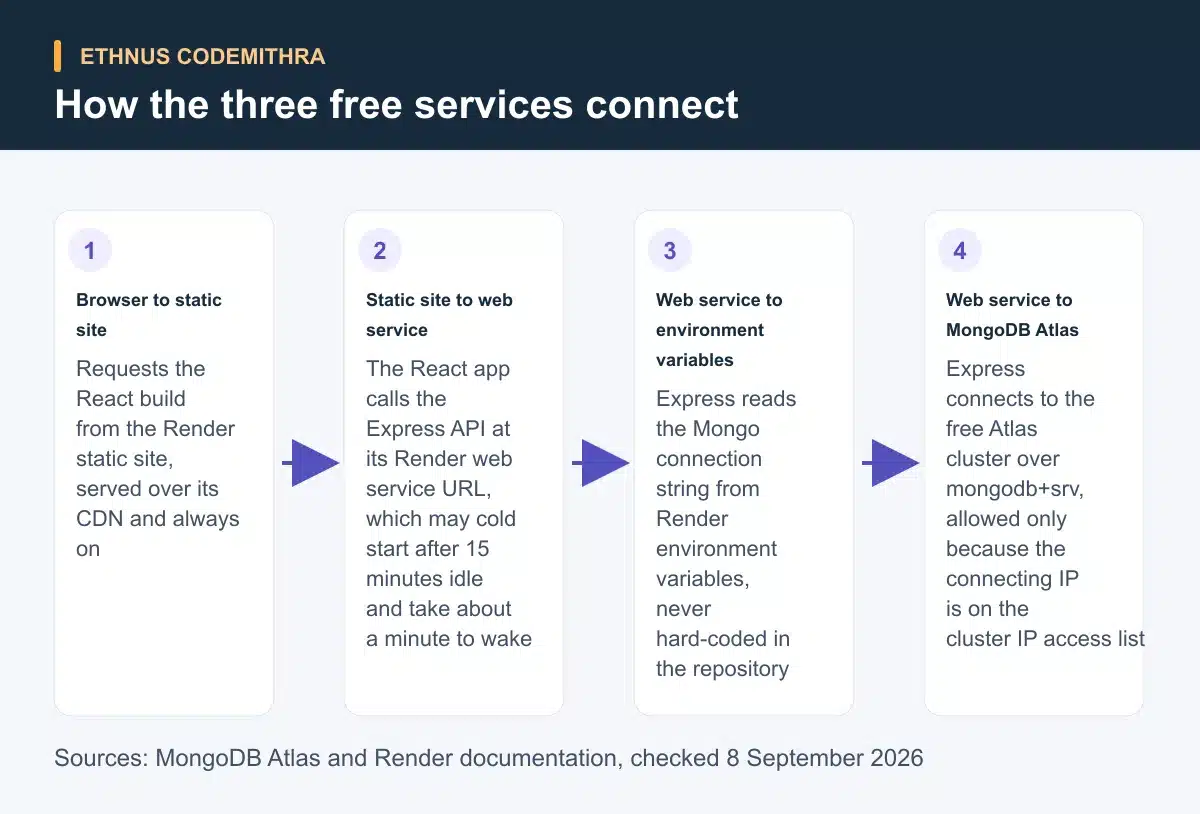
- MongoDB Atlas hosts the database on a free M0 cluster.
- A Render web service hosts the Express API.
- A Render static site hosts the built React app.
Step 1: create a free MongoDB Atlas cluster
Sign in to MongoDB Atlas and create a project. Then deploy a free M0 cluster by choosing a cloud provider and a region. The cluster becomes ready in under 15 seconds. It never expires and needs no credit card. Atlas allows only one free cluster per project (MongoDB Atlas).
Next, create a database user under Database Access. Atlas authenticates that user with SCRAM-SHA-256 by default. Pick a role scoped to just the database your app uses, rather than a broad one (MongoDB Atlas). Add your current IP address, or a range you control, to the project IP access list under Network Access. Atlas only allows client connections from an address already on that list (MongoDB Atlas).
Finally, select Connect on the cluster and copy the mongodb+srv:// connection string. This SRV format resolves the cluster hosts through DNS. MongoDB recommends it over the older standard mongodb:// format whenever it is available (MongoDB manual). Replace the placeholder password with the real password for that database user, before using the string anywhere.
Remember one gotcha before your demo. Atlas automatically pauses a free cluster after 30 days with zero connections (MongoDB Atlas). Pausing is not deletion. A paused cluster needs a manual resume from the Atlas dashboard before it accepts connections again.
Step 2: keep secrets out of your code
Before deploying anything, remove real credentials from your repository. Create a .env file in the Express project root. Add it to .gitignore, then store the Atlas connection string there as MONGO_URI. Read it in code with process.env.MONGO_URI. The real value then lives only in that local file, and later in the Render environment variable settings.
The frontend follows a different rule. In a Vite-built React app, only variables prefixed VITE_ are exposed to the browser. Vite bundles them into the built JavaScript at build time (Vite). That means a VITE_ variable is never actually secret. Anyone can open the built files for your site and read it.
The Vite documentation warns against putting sensitive information, such as API keys, in a VITE_ variable. The same caution applies to a Create React App variable prefixed REACT_APP_. Use these prefixes only for values that are safe to expose, such as the base URL of your deployed API.
Step 3: deploy the Express API as a Render web service
On Render, create a web service and connect the GitHub repository holding your Express API. Set a build command such as npm install and a start command such as npm start. Render then rebuilds and redeploys automatically on every push to the linked branch (Render).
Open the Environment tab for that service and add each variable your API needs, including MONGO_URI. Use the "+ Add Environment Variable" control to do this. Saving offers a choice: rebuild and deploy, redeploy the existing build, or save the values without deploying yet (Render).
Two free-tier limits shape how this API behaves in front of reviewers. A workspace gets 750 free instance-hours a month across its free web services. Going over that limit suspends all of them until the next month (Render).
A free web service also spins down after 15 minutes with no inbound traffic. Waking it back up takes about a minute (Render). The first request after idle time looks slow, not broken. Free web services also have no persistent disk. Do not rely on saving uploaded files to storage on the server itself.
Step 4: deploy the React frontend as a Render static site
Create a second Render service, this time a static site, pointed at the frontend folder of the same repository. A Create React App project builds with a command that runs yarn and then yarn build. It publishes from the build directory (Render). A Vite project instead publishes from dist.
React Router needs one extra setting. Add a rewrite rule that sends any path (/*) to /index.html. This stops a refreshed client-side route from returning a server 404 (Render). Render serves static sites over a global CDN, with managed TLS included at no cost (Render). Render does not document any spin-down behaviour for static sites. Your frontend therefore loads instantly, even while the API behind it is still waking up.
Step 5: connect the frontend to the backend and fix CORS
With both services deployed, point the frontend at the real API. Add an environment variable such as VITE_API_URL, set to the URL of your Render web service. Use it wherever the frontend currently calls localhost.
On the API side, allow only the Render origin of that frontend in your CORS configuration. Do not leave it open to every origin. The snippet below is illustrative. It shows the shape of the fix, not the actual values from one specific deployment.
require('dotenv').config();
const express = require('express');
const cors = require('cors');
const mongoose = require('mongoose');

mongoose.connect(process.env.MONGO_URI);

const app = express();
app.use(cors({
  origin: 'https://your-frontend.onrender.com',
}));
What each free tier limits, and what it means for your demo
| Component | Where it runs | Free-tier limit | What it means for your demo |
|---|---|---|---|
| Database | MongoDB Atlas free cluster | 0.5 GB storage, 500 connections, auto-pauses after 30 days with zero connections (MongoDB Atlas) | Do not panic if a dormant project needs a manual resume before it reconnects |
| API | Render web service | 750 free instance-hours a month per workspace, spins down after 15 minutes idle, about a minute to wake (Render) | Warn a reviewer the first request may take about a minute |
| Frontend | Render static site | Free, CDN-served, managed TLS included, no documented spin-down (Render) | Loads instantly, but it is a static shell waiting on the API to wake |
How this connects to the Ethnus MERN Full Stack program
Deploying a React app to the web is an explicit syllabus topic in the Ethnus MERN Full Stack program. It is not something students have to work out alone after the course ends. The same syllabus includes a dedicated MongoDB module covering CRUD operations, aggregations, indexing, replication and sharding. It also includes an Express.js module covering middleware and request handling. A React section covers HTTP requests and AJAX calls, the skill the frontend-to-API step in this guide depends on.
Trainers give step-by-step walkthroughs and clear doubts as they come up. The Codemithra Learning & Assessment Platform (CLAP) gives module-based assignments, so you can practise each piece before connecting them together.
Quick recap and troubleshooting checklist
If your deployed app does not work, check these in order.
- Confirm
MONGO_URIis set in the Render Environment tab, not only in your local.envfile. Render never reads files from your machine. - Confirm your connecting IP is on the IP access list for that Atlas project.
- Confirm the frontend CORS origin matches the exact URL of the Render static site, including
https. - Give a spun-down API about a minute to wake up before assuming the deploy failed.
- Confirm any frontend environment variable starts with
VITE_(orREACT_APP_for Create React App). Rebuild the static site after adding it.
Frequently asked questions
Does the MongoDB Atlas free cluster expire?
No. Atlas free clusters never expire and need no credit card. Atlas allows only one free cluster per project (MongoDB Atlas).
Why does my Render API feel slow the first time I open it?
A free Render web service spins down after 15 minutes with no inbound traffic. Waking it back up takes about a minute (Render). That first slow request after idle time is expected, not a broken deploy.
Can I store uploaded files on my Render API?
Not reliably. Free Render web services have no persistent disk. Files saved to storage on the server itself do not survive a restart or a new deploy (Render). Keep uploads in Atlas or another external store instead.
Why can the browser see my frontend environment variable?
Vite bundles any VITE_ prefixed variable into the built JavaScript at build time. It is never actually secret once deployed (Vite). Keep real secrets only in the Express API environment variables, never in the frontend.
What happens if I forget about a deployed capstone project?
Atlas pauses a free cluster automatically after 30 days with zero connections (MongoDB Atlas). Resume it manually from the Atlas dashboard before your next demo.
See the full curriculum, including the MongoDB, Express and deployment modules, on the Ethnus Codemithra MERN Full Stack program page.