
Nobody is retiring Flow. Agentforce supports two separate ways to add a new capability to an agent. You can register an autolaunched Flow as an agent action, or register an Apex method as an agent action. Keep building in Flow for a plain Salesforce record read or write. Reach for Apex once the action needs to call an outside system, or run logic that Flow cannot express cleanly. The rest of this article shows what each path requires, so you can pick correctly instead of guessing.
The real fork: two paths, not two products
The question is not whether to learn Agentforce instead of Flow. Salesforce documents Flow-based actions and Apex-based actions as two parallel, supported ways to build a custom action. It covers each one in a separate Trailhead module: Agent Customization with Flows and Agent Customization with Apex.
Both build on tools admins and developers already use elsewhere in Salesforce. Custom actions draw on autolaunched flows, invocable Apex classes and prompt templates. That is Salesforce's own framing in its overview of customizing agent actions. You are not choosing a new platform. You are choosing which existing skill fits a specific action.
What a Flow-only agent action needs
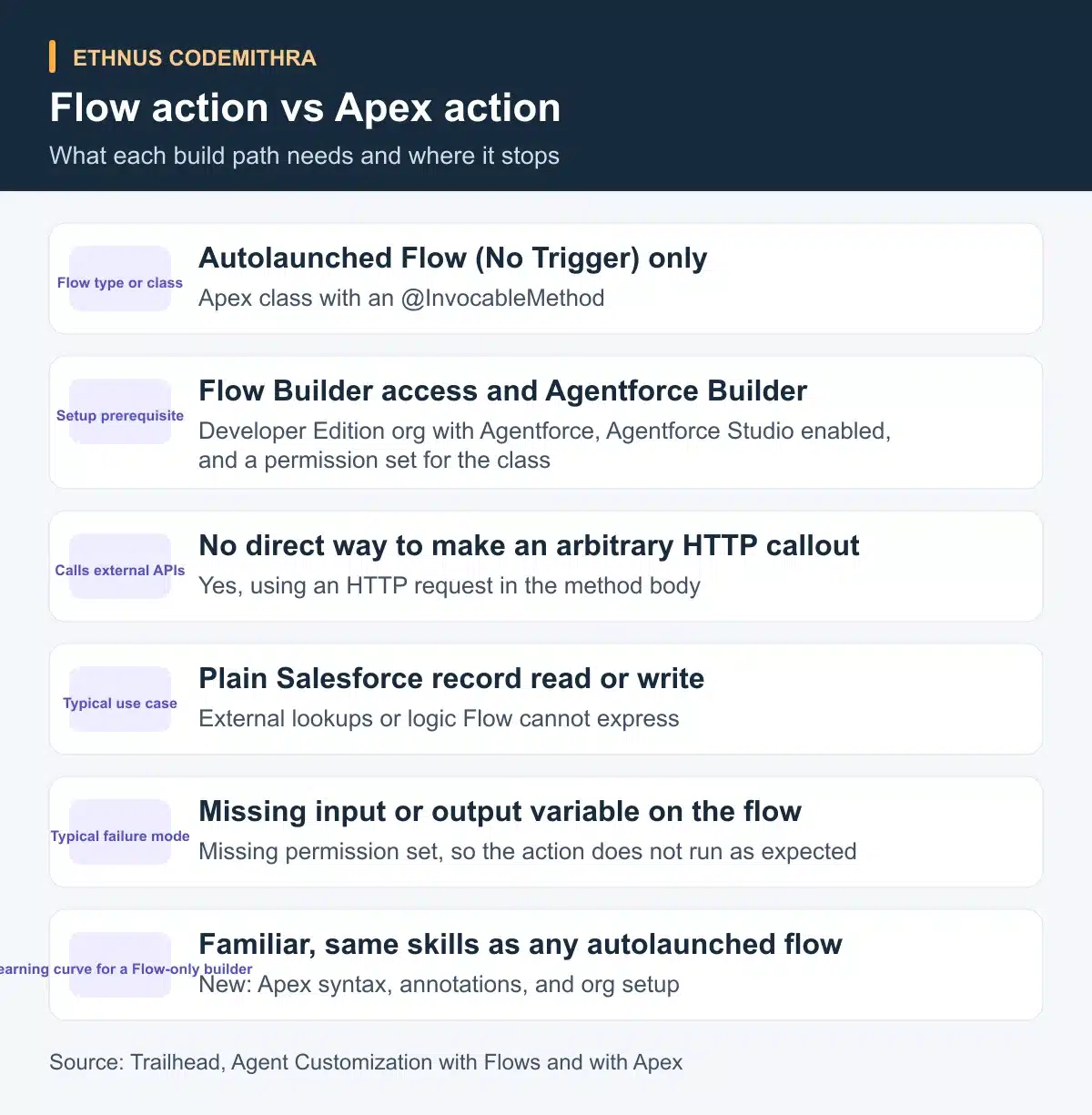
An agent action built on Flow has a fixed shape. Salesforce states that agent actions support only flows of the Autolaunched Flow (No Trigger) type. The same page requires at least one input variable and at least one output variable on every flow-based action. Even a flow that always succeeds should still output an error-message variable. That way, the agent does not improvise a generic answer when something goes wrong.
To register the flow, open Agentforce Builder's custom action screen. Set Reference Action Type to Flow. Then point Reference Action at the flow itself, as described in Add a Flow as an Agent Action. Two settings then shape how the agent uses each variable.
"Require input to execute action" tells the agent not to run the action until that data is available. "Show in conversation" controls whether the customer can see that output value's content. Scope one flow per discrete action. Use a natural customer touchpoint, asking for information or showing a result, as the boundary between actions.
Where Flow tops out
Flow's home turf is a deterministic, rules-based operation on Salesforce data. Look up a record, update a field, run an approval check. It has no clean way to make an arbitrary external HTTP callout from inside the action itself. It also has no room for computation or parsing beyond what Flow elements already offer. If the task fits entirely inside Salesforce data and existing flow logic, stop here. Building it as Flow keeps the skills you already use for any autolaunched flow.
What Apex adds
An Apex agent action starts with an @InvocableMethod. Its label and description parameters become the Agent Action Label and Agent Action Instructions. The agent reads those when it decides whether to use the action, according to Get Ready to Create an Apex Action. A precise description is what lets the agent match the action to a user's intent. Marking an input with @InvocableVariable(required=true) pre-checks "Require Input" in the generated action. The type you give an output variable, Decimal, String or Date, controls how the agent displays that value.
The unit's own example makes this concrete: an Apex action that calls an external weather API with req.setEndpoint() and req.setMethod('GET'). That is the class of task Flow cannot do on its own. A short, illustrative skeleton of the same structure looks like this.
public class GetOutsideDataAction {
    @InvocableMethod(label='Get outside data', description='Looks up a value from an external system for the agent.')
    public static List<Result> run(List<Request> requests) {
        List<Result> results = new List<Result>();
        for (Request req : requests) {
            Result r = new Result();
            // Build and send an HTTP callout here, then map the response.
            r.value = 'placeholder';
            results.add(r);
        }
        return results;
    }

    public class Request {
        @InvocableVariable(required=true)
        public String lookupKey;
    }

    public class Result {
        @InvocableVariable
        public String value;
    }
}
Treat that as a structure to study, not code to paste into a production org. Apex actions also carry extra setup. Salesforce requires a Developer Edition org with Agentforce enabled, with Agentforce Studio turned on in Setup. That is not a plain Developer Edition org or Trailhead Playground. The org also needs a permission set that grants access to the Apex class. Skip the permission set and, in Salesforce's own words, "Apex actions don't work as expected in Agentforce".
The decision test
Salesforce gives its own test for choosing between the three ways to build a custom action: Flow, Apex or a prompt template. Flow-based and Apex-based actions are deterministic. The same input produces the same rule-driven outcome every time. Prompt-template actions are non-deterministic, because they involve reasoning rather than fixed rules.
As the quick-look module puts it, the choice "comes down to whether the process you're automating is deterministic or not". Prompt templates sit outside this article's scope. Knowing they exist as the third option keeps you from forcing judgment-based work into a flow.
Inside the deterministic branch, the second question is simpler. Plain Salesforce record read or write, no external call: build a Flow action. Anything that needs an external API call or logic Flow cannot express: build an Apex action.
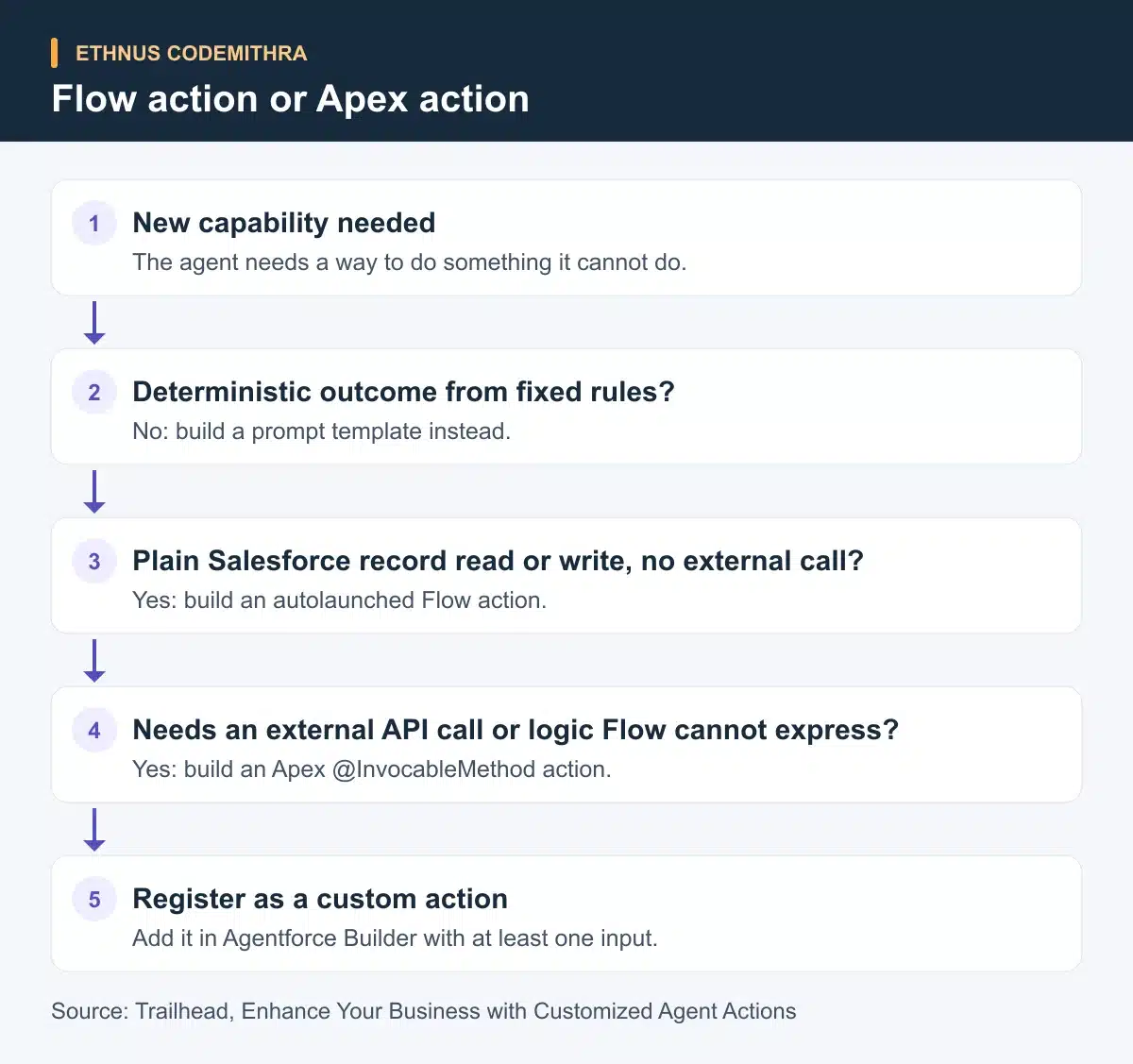
Flow action vs Apex action, side by side
The table below summarises the practical differences a Flow-only builder feels first. It covers setup cost, what each path can reach, and where each one usually breaks.
Try it yourself
Pick one simple task, for example, looking up a record by a code the customer types in. In a Developer Edition org with Agentforce enabled, build it twice. First, as an autolaunched Flow registered as an agent action, with the required input and output variables in place. Second, as an Apex @InvocableMethod action, with a permission set that grants access to the class. Time each build.
Then test both with a slightly messier input: an extra space, a lowercase code, a missing field. Compare which one handles it with less rework. That difference is the practical version of the decision test above.
Where this fits at the Codemithra Salesforce Developer course
Both paths sit on top of skills the Codemithra Salesforce Developer course already teaches by name. The program runs 200 hours across 15 sections and 84 lessons. Its beginner modules cover Apex Basics and Database, Apex Triggers and Salesforce Flow. The intermediate modules add Lightning Web Components, Asynchronous Apex and Platform Events Basics.
The course also includes industry-relevant projects and mentoring sessions, with lab environment access. That combination lets a student practise Apex and Flow with feedback, rather than only reading about them. Agentforce work is not a named module in the current syllabus. Treat this article as the next step after that Apex and Flow foundation, not as something the course teaches directly today.
Frequently asked questions
Can I build every agent action with Flow and skip Apex entirely?
Only if every action is a deterministic, plain Salesforce data operation. Once an action needs an external HTTP callout, or logic Flow cannot express, Flow has no direct way to do it. Apex is the documented path for that case.
Does an Apex agent action need a special org?
Yes. Salesforce specifies a Developer Edition org with Agentforce enabled, with Agentforce Studio turned on in Setup. That is more specific than a plain Developer Edition org or Trailhead Playground.
What is the most common reason a Flow action fails silently?
A missing input or output variable. A flow-based action always needs at least one of each. An output that carries an error message keeps the agent from improvising an answer when the flow fails.
What is the most common reason an Apex action does not run as expected?
A missing permission set. The agent needs a permission set that grants access to the Apex class, or the action does not work as expected inside Agentforce.
Where do prompt templates fit into this decision?
They are Agentforce's third way to build a custom action, used for non-deterministic, reasoning-based work rather than fixed rules. This article covers only the Flow and Apex paths.
Start with the Apex and Flow modules inside the Codemithra Salesforce Developer course if either path still feels unfamiliar. Then come back and build the same task twice, as described above.